I’ll be honest with you. The first time someone told me that Google had quietly embedded one of the most powerful A.I. platforms on the market directly into Gmail, Docs and Drive, my first reaction was disbelief. My second reaction was mild embarrassment, because I had been paying for Google Workspace for years and had absolutely no idea what was sitting right under my nose (and I write this newsletter). And if you are an attorney, someone whose career depends on the quality of your written work, the speed of your research, and the volume of your client communications, this one should make you stop scrolling. Gemini is not a separate tool you have to go find, subscribe to, and convince your firm to adopt. If you use google busines products in your practice, Gemini already IN your inbox. It is already IN your documents. And if you are not using it right now, you are essentially leaving a very capable associate sitting in the corner of your office doing absolutely nothing. Enter Gemini, where the familiar becomes extraordinary, and where the tools you already trust start working twice as hard.
Favorite law firm use cases: Drafting a demand letter in Google Docs using the case facts you paste directly into the sidebar; summarizing a 40-email thread with opposing counsel before jumping on a call; letting Google Meet write your intake call notes and action items automatically so you never touch a notepad again.
Features & Functionality
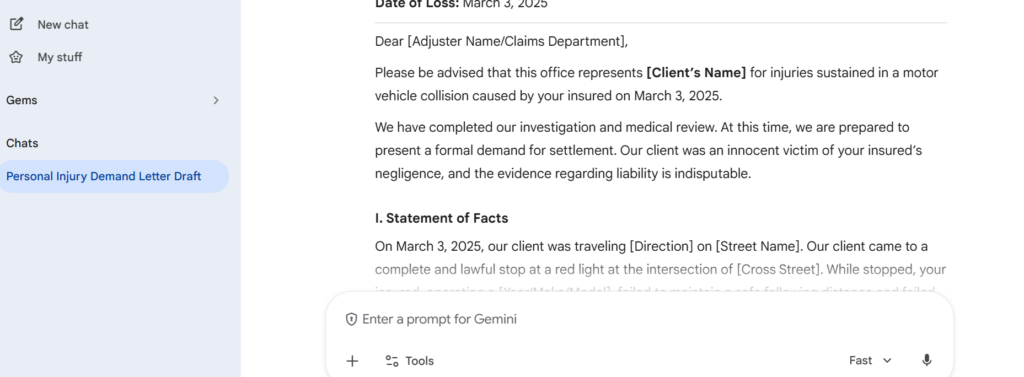
Let’s cut to the chase: the most underrated thing about Gemini is that it does not ask you to change anything about how you work. If you already draft in Google Docs, Gemini is right there in the sidebar, ready to take your raw case facts and turn them into a polished first draft of a demand letter, a motion outline, or a client-facing summary, without you switching tabs, copying text into a separate tool, or learning a new interface. I want you to think about how many times a week you write something from scratch that you could have handed off to a competent first draft. That number is probably higher than you want to admit. Gemini handles that first draft. You handle the judgment. That is the right division of labor.
Here is what that looks like when you actually run it. I opened Gemini and typed a single prompt: “Draft a demand letter for a personal injury case. Client was rear-ended at a stoplight on March 3, 2025. Client suffered whiplash and lumbar strain. Medical bills total $18,400. We are demanding $75,000 from the at-fault driver’s insurance carrier, State Farm. Tone should be firm and professional.” That is it. No template. No formatting instructions. No prior context. And what came back, in seconds, was a structured, professionally worded demand letter with a proper opening, a Statement of Facts, liability language, and a settlement demand. The kind of first draft that would have taken a junior associate the better part of an hour to produce. Pardon the placeholder brackets for client-specific details, but that is actually the point. Gemini hands you the architecture of the letter fully built, and all you do is plug in the facts and apply your legal judgment. That is not a small thing when you are managing a full caseload.
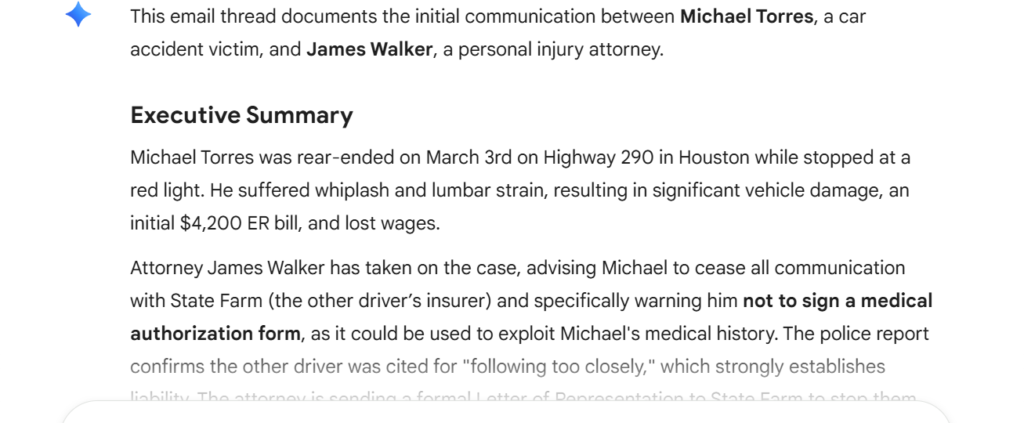
Now let’s talk about Gmail, because this is where things get really interesting for attorneys who live in their inbox. You know that email thread that has been going back and forth for three weeks between you, your client, opposing counsel, and two paralegals? The one you have to scroll through for ten minutes every time someone sends a new message just to remember where things stand? Gemini reads the whole thing and gives you a narrative summary in seconds. And here is where I genuinely did not expect to be impressed: it does not just summarize, it surfaces action items, flags unresolved issues, and can draft your reply based on the context of the entire thread. For a litigator managing parallel cases, this alone is worth the price of admission.
Here is exactly what that looks like. I created a six-email thread between a personal injury client, Michael Torres, and his attorney James Walker, a real back-and-forth covering the accident details, ER bills, State Farm calling repeatedly, a medical authorization form the insurer was pressuring the client to sign, and next steps before their consultation. I typed one single prompt into the Gemini sidebar: “Summarize this email thread and list any pending action items.” What came back was an Executive Summary that captured the accident facts, the attorney’s key warnings, the liability evidence in the police report, and the outstanding action items, all in a clean, structured narrative. Six emails worth of critical case context, distilled in seconds. That is not a trick. That is just Gemini doing exactly what it is supposed to do.
And that is just email. The same applies to meetings, client calls, and strategy sessions. Gemini documents, summarizes, and organizes everything that would otherwise end up in a notepad nobody opens again. But if there is one area where the impact is truly immediate for any attorney, it is research.
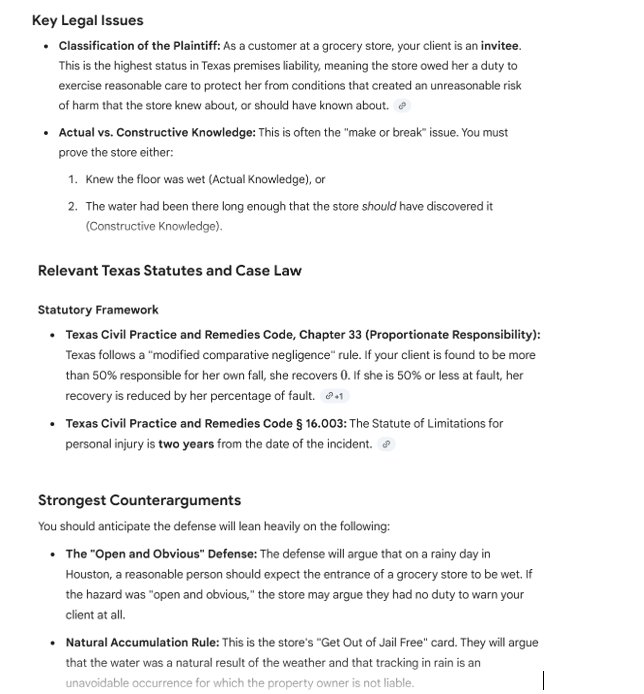
And then there is research, the place where attorneys spend enormous amounts of time doing work that is valuable but deeply inefficient in its early stages. I want to be clear: Gemini is not replacing Westlaw or your specialized legal research tools. What it IS doing is giving you a dramatically faster on-ramp. When a new matter lands on your desk, you can ask Gemini to outline the key legal issues, summarize the relevant statutory framework, and flag the strongest counterarguments, all before you open a single research tab. You arrive at your deep research phase already oriented, already focused, and far less likely to miss the angle that opposing counsel is going to find first. That is not a small thing.
Here is what happens when you actually run it. I prompted Gemini with a single request: “Outline the key legal issues, relevant statutory framework, and strongest counterarguments for a personal injury case involving a slip and fall at a commercial property in Texas. Client is a 45-year-old woman who slipped on a wet floor near the entrance of a grocery store in Houston on a rainy day. There were no wet floor signs posted. Client suffered a fractured wrist and a torn meniscus in her right knee. We are claiming negligence against the property owner.” What came back was a fully structured legal outline, plaintiff classification as an invitee under Texas premises liability, the actual vs. constructive knowledge distinction that will make or break the case, the Natural Accumulation Doctrine the defense will lean on, relevant statutes including Texas Civil Practice and Remedies Code Chapter 33 on proportionate responsibility, key case law including CMH Homes v. Daenen and Brookshire Grocery Co. v. Taylor, and a full breakdown of the strongest counterarguments to anticipate, open and obvious defense, comparative fault, and pre-existing conditions. All of that, from one prompt, before I opened a single research tab. That is the on-ramp I was talking about.
Pricing & Plans
Here is where I think a lot of attorneys are going to do a double take. If your firm already uses Google Workspace, and the majority of firms do, Gemini’s core features are already included in your subscription. Google bundled it in for all Workspace plans starting in early 2025. For those who want the full professional experience, Google AI Pro runs $19.99 per user per month and includes a one-million-token context window, plus full integration across Gmail, Docs, Sheets, Slides, and Meet. And for those who want to go all in, Google AI Ultra is available at $124.99 for three months, roughly $42 per month, and unlocks the highest access to Google’s most powerful models including Deep Think reasoning mode. Let me do the math the way I like to do it: if Gemini saves you 30 minutes of drafting per day at a billing rate of $300/hr, that is $75 of recovered time, daily, for a tool that costs less than your monthly streaming subscriptions. And if you are not convinced yet, Google AI Pro offers a first month free trial. One month. On a real caseload. With real documents. I challenge you to try it and tell me it did not pay for itself in the first week.
What Makes It A.I. Enabled?
Gemini is built on Google’s own family of multimodal large language models, the same research infrastructure behind Google Search, but now trained for reasoning, writing, and analysis at a professional level. The version available to attorneys through AI Pro and Workspace runs on Gemini 2.5 Pro, with access to a one-million-token context window, which in plain language means it can read and reason across an entire case file without losing track of what it read on page one. For complex matters, Google’s Deep Think mode activates extended reasoning chains, meaning the A.I. actually works through a problem step by step rather than pattern-matching a surface-level response. The system also grounds its responses in real-time Google Search when needed, so it is not just reasoning from training data, it can pull current information when the task calls for it. For attorneys, that distinction between a tool that pattern-matches and one that actually reasons is not academic. It is the difference between a draft you have to rewrite and one you can actually use.
Security & Privacy
I know what the first question is, because it is always the first question: what happens to my client data? Here is what Google says clearly and on the record. At the Pro and Workspace levels, your data is not used to train Gemini’s models without your explicit permission. The platform uses the same enterprise-grade encryption and access controls that Workspace business customers have relied on for years, including data segregation, audit logs, and compliance-grade security infrastructure. The free tier is a different story, and I would not recommend using it for client work, full stop, for the same reason I would not recommend using any free consumer A.I. tool for confidential legal matters. But for firms operating on Workspace Business or AI Pro, the protections are real, they are documented, and they meet the bar that most state bar ethics frameworks would expect from a practice technology tool.
The Judgment
Here is my honest take: Gemini is not the most specialized legal A.I. tool on the market. If you need deep contract analysis or citation-verified case research, there are purpose-built tools for that and I will review them. But what Gemini IS is the most accessible, most immediately useful and, for most firms, most affordable A.I. upgrade available right now, because there is a real chance you are already paying for it. The combination of document drafting, email intelligence, and automatic meeting documentation inside the tools your firm already uses every day represents a genuine and meaningful shift in how much administrative and cognitive load lands on the attorney. My recommendation: if you are on Workspace, turn it on today. If you are not sure what you have access to, spend five minutes finding out. And if you want to go all in, the one-month AI Pro free trial is the lowest-risk test drive in legal tech. Take it.
Have Feedback?
I’ve reserved a special space each week for you to vent, supplement with relevant info, or ask questions about the product. The only way the content gets better is if you participate. I look forward to hearing from you! You can e-mail me here.