
You leave a two-hour call with a client. You wrote three lines. The rest is in your head, and that is where it stays until you sit down to draft the memo, usually too late and usually without the exact phrase the client said at minute forty-seven. Meanwhile, in almost every other industry, that meeting would already have had a bot taking notes, transcribing the conversation, and assigning tasks before it ended. For lawyers, it is not that simple. A generic notetaker inside a privileged conversation can raise questions about third parties, discoverability, confidentiality, and what information ultimately becomes part of a record. That is why many firms have had to limit or ban these tools. Lua was built around that exact problem: not transcription first, but privilege first.
Favorite Law Firm Use Cases: client meetings, calls with opposing counsel, depositions, witness interviews, and turning those conversations into memos, follow-ups, tasks, and time entries.
Inside the Product
The first thing you notice is that Lua is not designed to automatically follow you from meeting to meeting. From the dashboard, you decide how you want to bring it in: you can start an in-person meeting, add it to a video conference, or use it for a phone call. For video conferences, you can paste in the meeting link and decide when you want Lua to join.

During the meeting, Lua functions as more than a recorder. It transcribes in real time, lets you take manual notes, and answers questions about what is happening as the conversation unfolds. If you need to remember something someone said a few minutes earlier, you can ask Lua directly without interrupting the meeting to look for it. You can also upload documents during the conversation and use them as context to compare information or check what you just heard.
More importantly, that control extends to what actually gets recorded. Lua lets you pause and resume the session, go off the record for certain moments, strike specific portions of the conversation, or cancel the entire note. That control happens while the meeting is taking place, not afterward, giving you a way to decide what information ultimately becomes part of the record.
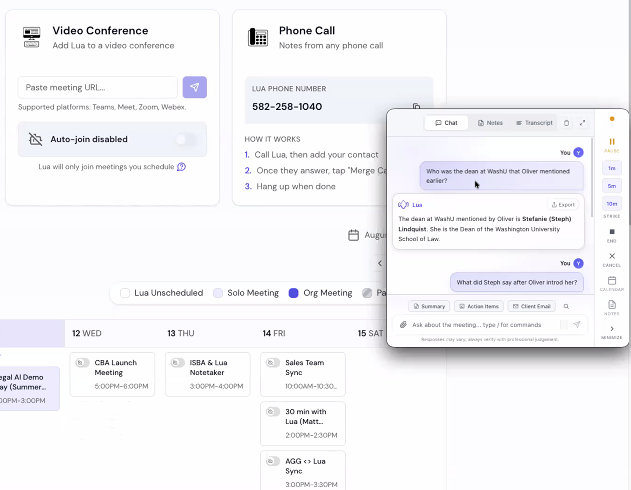
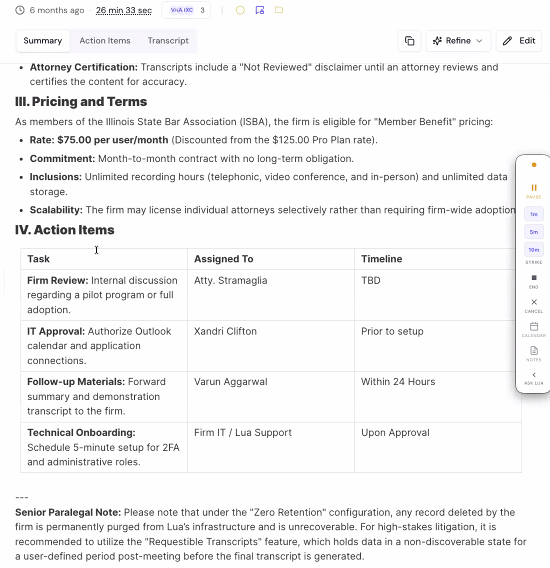
When the meeting ends, Lua organizes what happened into a summary, a transcript, and a list of dated action items. Action items can be tied back to the part of the conversation where they came from, and when appropriate, Lua can prepare drafts of emails, calendar invitations, and other follow-ups. The idea is that the meeting does not simply end with a transcript. It ends with work that can continue from there.
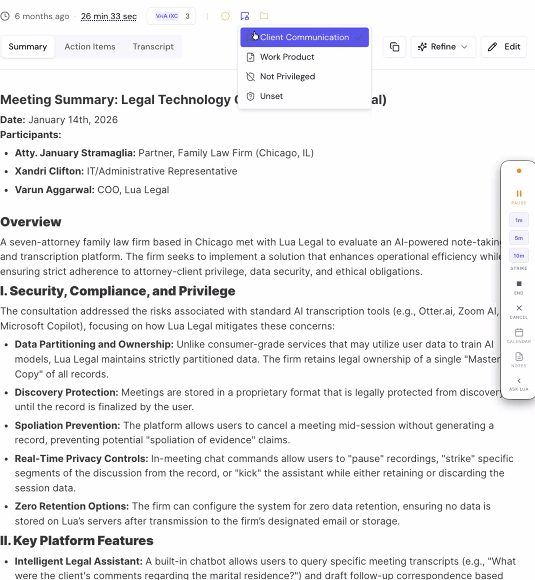
Then comes one of the more important features for a legal environment: deciding how the note should be treated. Lua lets you classify it as client communication, work product, not privileged, or leave it unclassified. You can also mark it as reviewed by an attorney, which locks further edits and records that status in exports.
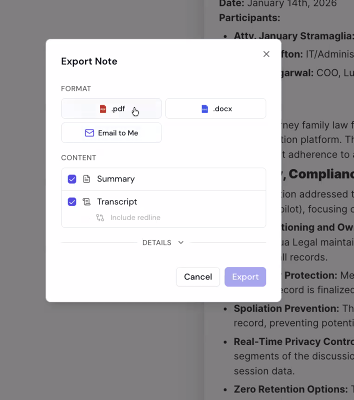
The attorney also remains in control of what happens to the information afterward. Notes are not automatically shared with everyone who participated in a meeting. You decide whether to share them internally, generate a secure link for someone else, export them as a PDF or Word document, send them by email, or connect them to your case management system. You can also use the same information to generate time entries for billing.
And the information does not have to sit in a folder that no one ever opens again. Lua lets you organize notes by client or matter and search them using natural language, for example, to find what you told a client about a particular issue or who mentioned a certain date. You can also turn a note into another type of document, such as converting a meeting with opposing counsel into a meet-and-confer memo using an existing template or your own.
Finally, if you do not want to open the dashboard, you can work with Lua from your email. You can ask it about a meeting, case, or note and use that information to generate responses, summaries, documents, or follow-ups directly from your inbox.
Cost
Lua offers three plans priced per user per month. Notetaker costs $50 to $75, depending on whether you pay monthly or annually, and includes unlimited notes across phone calls, video conferences, and in-person meetings, along with privilege and review controls, options to go off the record during a meeting, case management system integrations, and the ability to securely share or export notes in Word and PDF. Assistant costs $75 to $125 and adds the ability to chat with Lua during or after meetings, as well as generate email drafts, time entries, calendar invitations, memos, and other documents. Enterprise includes everything in Assistant, plus custom integrations and workflows, dedicated onboarding and support, SSO, and BYOK. Lua does not publish an Enterprise price, so firms need to contact the company directly.
Why It Works
The most interesting thing about Lua is not that it can transcribe a meeting. It is that it puts attorney control before the record exists. Instead of creating a complete transcript and leaving the user to decide what to do with it afterward, Lua lets you pause, go off the record, strike specific portions, or cancel the note during the meeting. For a lawyer, that distinction matters because the question is not simply how accurate the transcription is, but what information ultimately becomes part of a record and how that record is handled afterward. Lua starts with that reality in the product design.
Privacy & Confidentiality
Privacy and confidentiality are central to Lua’s proposition. The platform offers controls around privilege, note review, data retention, and where records are stored. Lua also states on its website that it has SOC 2 and ISO 27001 certifications and offers Zero Data Retention options.
But those credentials do not eliminate an attorney’s responsibilities. Before using Lua for sensitive conversations, it is worth understanding exactly how retention policies are configured, where data will be stored, and what happens to information that you choose to retain. There is also an issue that does not depend on Lua: recording-consent rules vary by jurisdiction. The platform may give attorneys more control over what gets recorded and how it is stored, but the responsibility to use those features in accordance with the applicable rules remains with the firm.
Verdict
Yes, I would recommend it, with one condition: I would first test the record-control features in a low-risk meeting, make sure you understand how striking and cancellation work before using them in a deposition or particularly sensitive conversation, and confirm with the firm how recording-consent rules apply. That said, Lua is one of the tools in this category that most clearly understands that, for lawyers, the problem does not end when a meeting ends. It also matters what record was created, what information it contains, and who can access it. Its proposition is not simply to take better notes, but to offer the productivity of an AI notetaker without treating legal conversations like ordinary corporate meetings. That distinction is precisely what makes Lua interesting.
Have Feedback?
I’ve reserved a special space each week for you to vent, supplement with relevant info, or ask questions about the product. The only way the content gets better is if you participate. I look forward to hearing from you! You can e-mail me here.