Legal research can be the most tedious part of your week. Hours spent reading sometimes irrelevant cases, bouncing between PDFs and outdated databases, just to find a couple of useful lines. Recently I tried Midpage. Instead of hunting for legal fragments like solving a blindfolded puzzle, Midpage gives me complete, relevant answers — explained by AI. It feels like I’m talking to a seasoned colleague who already knows my case. It all starts with a simple natural language question entry. And just like that, Midpage finds the exact cases, shows me the relevant citations, and — most importantly — explains how they relate to my situation. It’s like Google, if Google were a lawyer.
Favorite law firm use cases: Legal research in seconds. Argument drafting grounded in precedent. Explaining case law using natural language queries.
Features & Functionality
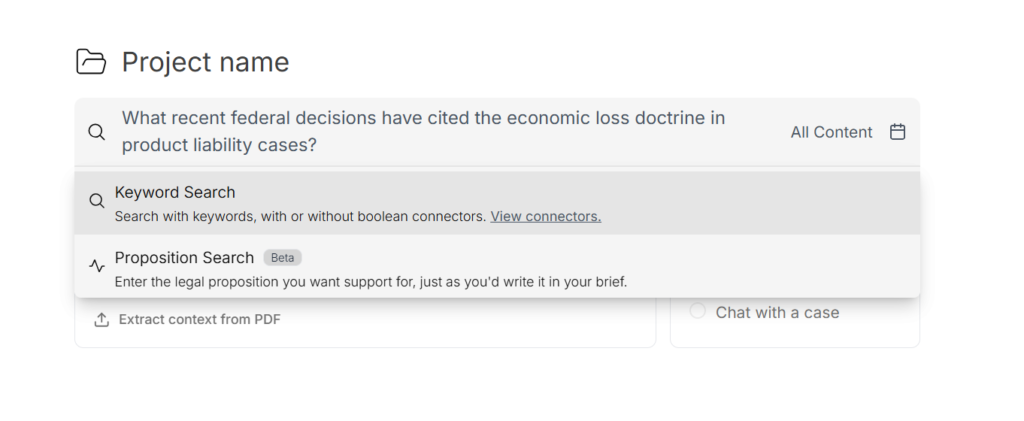
The first time I used Midpage, I typed into the search bar the same thing I’d usually ask a colleague after a frustrating hearing: “Is there any recent case law where a judge granted a motion like this under similar circumstances?” What I found amazed me. Midpage didn’t just list related cases — it explained how they connected to my facts, what arguments had worked, and in which courts. It was like having a brilliant associate who never sleeps.
In the screenshot, you can see exactly how this experience begins: I typed my legal question in plain English, and the platform gave me two search modes — by keyword or by legal proposition — so I could pick the one that fit my need. Right next to the search bar, a dropdown menu lets you filter by legal source: case law, constitution, statutes, or regulations. This makes the results even more accurate from the very start.
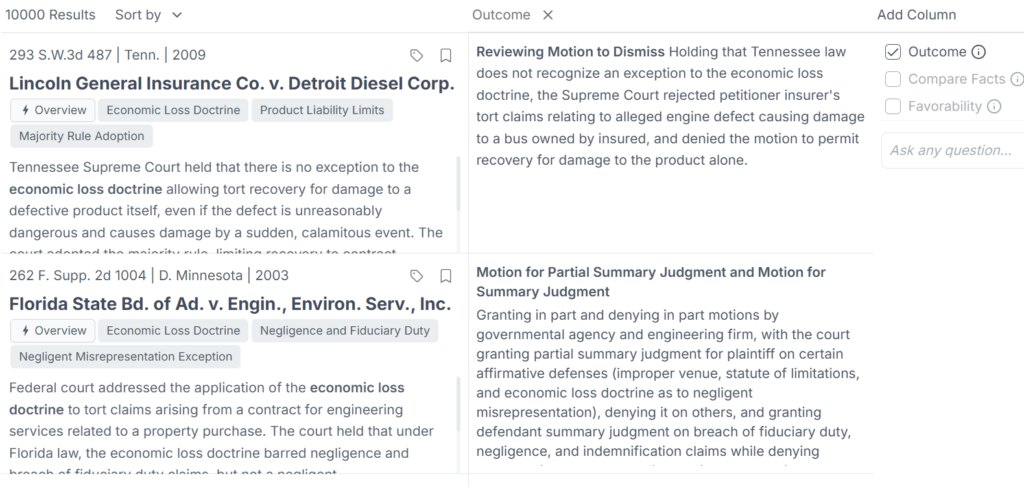
One of Midpage’s strongest features is how it organizes results. No more endless PDFs or isolated fragments. Midpage highlights the relevant parts of a case, with full legal citations, contextual annotations, and direct links to explore further. Plus, by clicking on any paragraph, you can get a summary, a simplified explanation, or even a rephrased version — perfect for when you need to explain something complex to a client or a teammate.
In the screenshot, you can see how results are presented after a search: relevant cases appear, labeled with key topics (like “Economic Loss Doctrine” or “Negligent Misrepresentation Exception”) and accompanied by a brief legal summary. When the “Outcome” column is enabled, the platform automatically reveals the result of each decision, helping me quickly see how each court ruled on a specific motion. This saves me hours of reading and analysis.
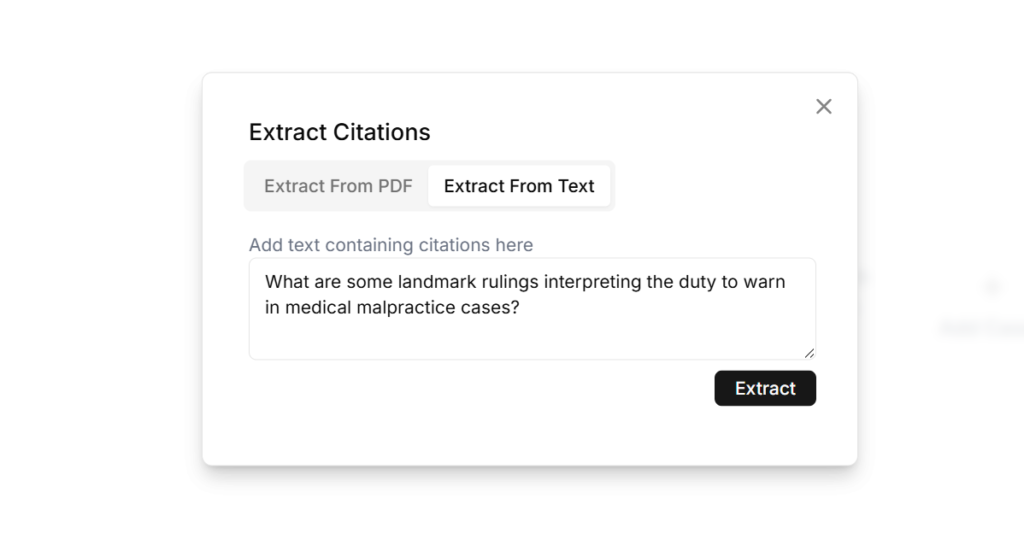
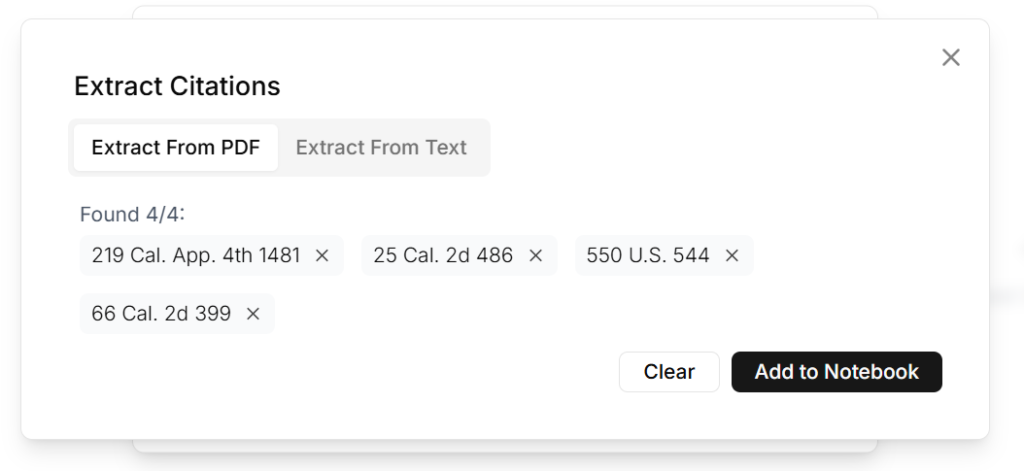
Midpage’s legal “copilot” functionality is another highlight. You can chat directly with Midpage and ask complex questions about case law, legal theory, or argument structure. It replies with precision and full references. You can literally ask: “What’s a strong argument to oppose this motion based on Supreme Court precedent?” — and it delivers, cases included. It feels like an intellectual sparring partner who’s always available. And if you already have a document — like a legal brief in PDF format — you can use the citation extraction tool: Midpage automatically identifies relevant legal references (as shown in the screenshots), so you don’t waste time copying and pasting manually.
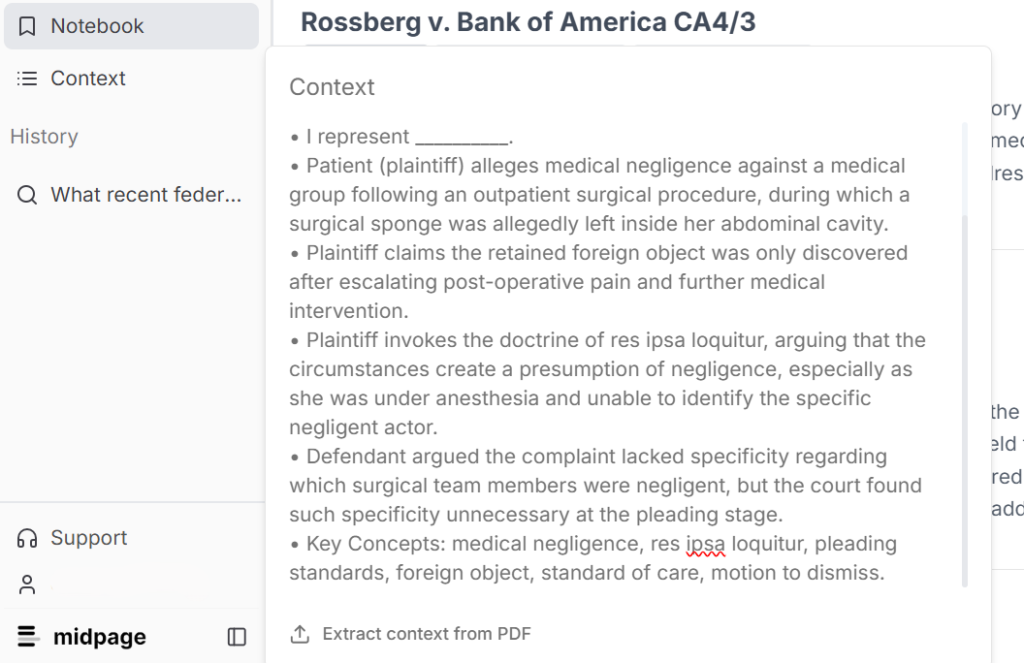
Best of all, all of this happens inside a clean, fast, distraction-free interface. You don’t need five tutorials to get started. From the moment you enter, it invites you to write, explore, experiment. It’s a tool built with love for simplicity — but with legal power that truly impresses. One clear example of that efficiency is the “Context” feature. When you upload a case in PDF, clicking that button automatically provides a clear summary: key actors, relevant doctrines, presented arguments, and essential legal concepts. So you’re not just reading a ruling — you’re understanding it in depth from the very first glance — as shown in the screenshot.
These kinds of features don’t just save time — they elevate the quality of legal analysis. Midpage doesn’t aim to replace your professional judgment, but to amplify it. It brings clarity where there used to be noise — and in the legal world, that’s pure gold.
Pricing & Plans
Midpage offers a 14-day free trial with no credit card required — the perfect opportunity to explore everything the platform has to offer before committing. If you’re an occasional user, you can start with the free plan to try out its AI-powered search engine and understand how its legal intelligence works. For more frequent use, the Professional plan is $99 per month and includes full access to the legal research platform, unlimited searches, natural language analysis, legal AI chat, and its powerful precedent database. Law students and faculty can access the same professional-grade platform for just $10 per month with academic verification. For firms or legal departments that need more customization, the Enterprise plan offers SSO, a tailored usage dashboard, and flexible pricing to match your team’s needs. Whatever your level of practice, there’s a Midpage plan designed to support your legal work intelligently and securely.
What Makes It A.I. Enabled?
Midpage is not just a legal database, but an advanced semantic engine specifically trained in legal language, enabling it to understand complex questions and provide contextualized answers. Midpage uses multiple large language models (LLMs) tailored for different tasks within its AI-powered legal research platform. Their approach involves selecting specific LLMs based on the needs of each AI feature, balancing speed and intelligence. For example, they utilize models like GPT-4o-mini for fast, real-time responses and Gemini 2.5 Flash for more complex, in-depth tasks. They also implement an LLM-as-judge pattern where production models generate answers and GPT-4o grades these outputs to ensure precision and accuracy. This extensive fine-tuning and iteration process, involving lawyers in prompt engineering, ensures that each AI function performs optimally within the legal domain.
Security & Privacy
When it comes to security and privacy, Midpage doesn’t cut corners. All information transmitted through the platform is encrypted—both in transit and at rest—ensuring that your queries remain strictly between you and the tool. Midpage does not use your private searches or the content you explore to train its model, and it doesn’t store your history unless you explicitly allow it. Its commitment to confidentiality goes beyond the technical: it’s built on an ethical foundation that respects the privacy standards demanded by legal professionals. See their data security page for details.
The Judgment
If you’ve ever spent hours chasing the right precedent or wading through irrelevant results, Midpage was built to change that. It doesn’t replace your legal judgment — it enhances it. With faster access to the cases that matter, clearer context, and tools that work the way you think, Midpage turns research from a chore into a strategic advantage. You don’t need to change your workflow or train your team. Just open a tab and start searching. After a few queries, you’ll understand why more firms are quietly making Midpage part of their daily stack — and not looking back.
Have Feedback?
I’ve reserved a special space each week for you to vent, supplement with relevant info, or ask questions about the product. The only way the content gets better is if you participate. I look forward to hearing from you! You can e-mail me here.