When Google Labs announced NotebookLM, the tech world tilted its head in curiosity. Could it be the answer to our dream of a personalized, A.I.-powered research tool that provides comprehensive, contextual summaries of your documents , you tube videos and web sources with precise citations and intelligent insights? (I know, I didn’t know I wanted that either, but now I can’t live without it -) 😆). Well, I’m happy to report that NotebookLM is indeed an incredible AI tool on a mission to make knowledge more accessible, concise, and intelligently organized. It’s your streamlined guide through the complex information landscape we live in.
Favorite law firm use cases: Easier document research with AI-powered summaries, intelligent cross-referencing, and contextual insights for legal professionals seeking efficient research solutions.
Features & Functionality
NotebookLM operates as an AI-powered document research and analysis tool, bringing an innovative twist to your research. Think of it as an amalgamation of a trusted assistant, a comprehensive research library, and that colleague who always has a brilliant insight ready. I really can’t do justice to all of the amazing use cases for NotebookLM. It seems as though someone finds a new use case every day, both professionally and personally. In this review I will give you one use case, but you are not limited to my use. Check out this 10 Ways To Use NotebookLM, In Less Than 10 Minutes video that will really amaze you.
Imagine if a Google search could not just search documents, but truly understand their context, pulling insights from various sources and linking you directly to critical information. That’s the experience NotebookLM offers. It feels like a more connected, informed version of traditional research tools, with one significant difference—an intelligent system that provides real-time, source-linked information about your uploaded documents and linked sources.
To demonstrate its capabilities, I conducted a sample research scenario involving how an attorney might approach building a technology forward law practice. Consider the number of e-newsletters, state bar articles, blogs, articles, white papers, podcasts and YouTube videos in existence that could help guide you in such a task. It’s overwhelming, right? Well, NotebookLM is a tool that can bring these various resources together and deliver to you actionable insights in an easy to digest format.
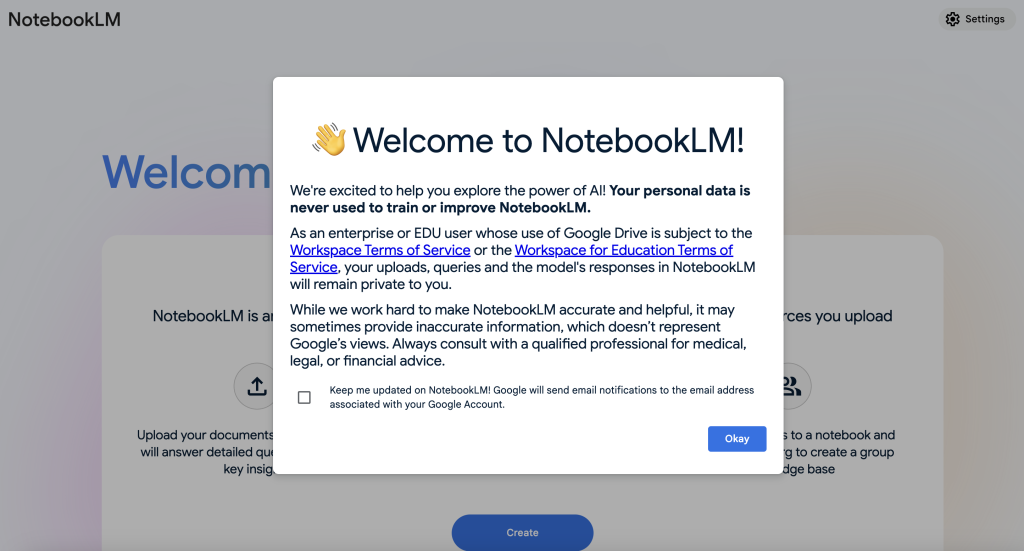
Setting up a NotebookLM account is very simple. Head to the main NotebookLM login page and you will be prompted to login with a Google Login. Once logged in, you will see a Welcome message and a rather simple interface. In this case I used an e-mail that operates under a Google Workspace (paid) account. NOTE: You can also use your personal Gmail account, but I caution that NotebookLM accounts created with a gmail.com e-mail, by default, can still used uploaded information to train its A.I. model and although data is anonymized, you can’t be certain client information is not being used by the A.I. model.
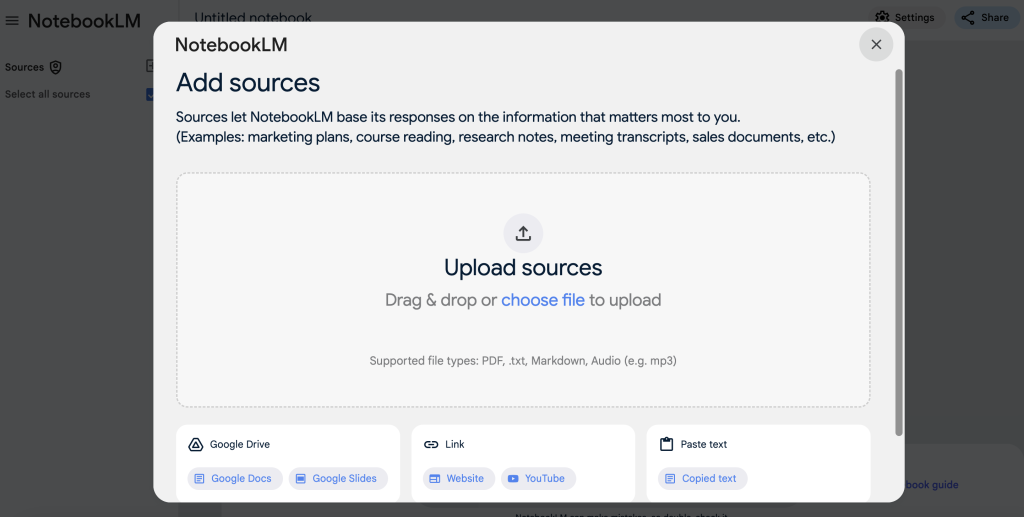
To begin using NotebookLM you will want to navigate to the left and Add Sources. You will be prompted to Upload whatever you desire, whether it’s a PDF or Word doc, or a link to a website or YouTube link. The source materials you can upload are entirely up to you.
I added in 7 PDFs that I have downloaded over the past few months (White Papers or Reports) that had something to do with using A.I. in law practice, workflow automation, business plan creation for lawyers or surveys of lawyers and law firms pertaining to technology use. Alone these represent hours of reading. I have not even gotten through them all yet. I also linked to a YouTube video about AI tools to use in a law practice and lined to 3 additional websites that had related content. Once done I was prompted with a Notebook Guide. This is NotebookLM’s attempt to summarize the content you uploaded to give you ideas on how to prompt. Don’t feel boxed in with it. NotebookLM wants you to ask it to prompt a deliverable. In this case I wanted it to draft a guide for me.
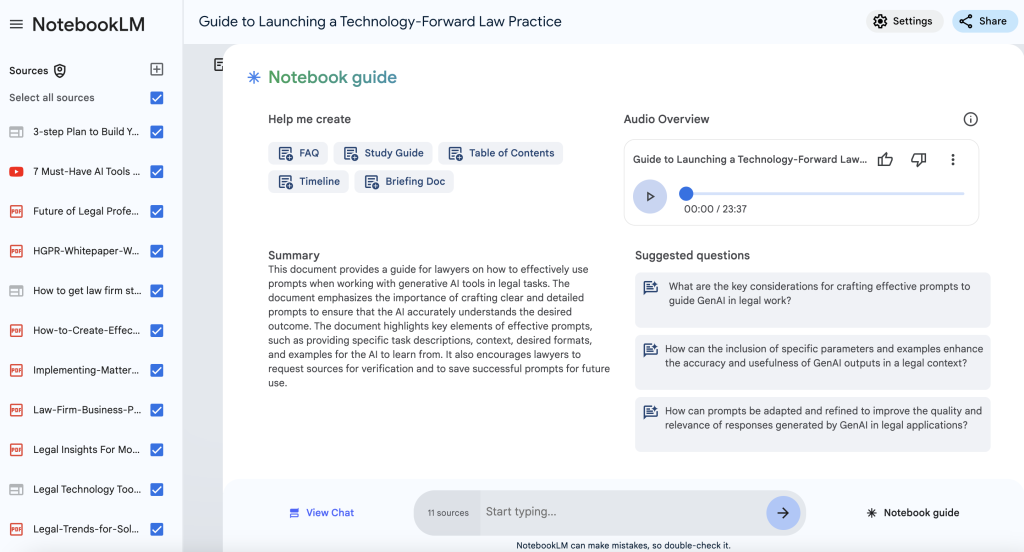

The prompt I entered called for a Guide to launching a technology forward law practice. NotebookLM then got to work. After a minute or so it delivered a comprehensive summary or the compiled resources in an easy to follow format, complete with precise citations and nuanced insights.

The platform’s ability to understand context is remarkable. Want to go deeper? You can click embedded links to see source materials—a true blessing when verifying the accuracy of AI-generated insights. The system provides background, summaries, key findings, and even suggests related areas of investigation.
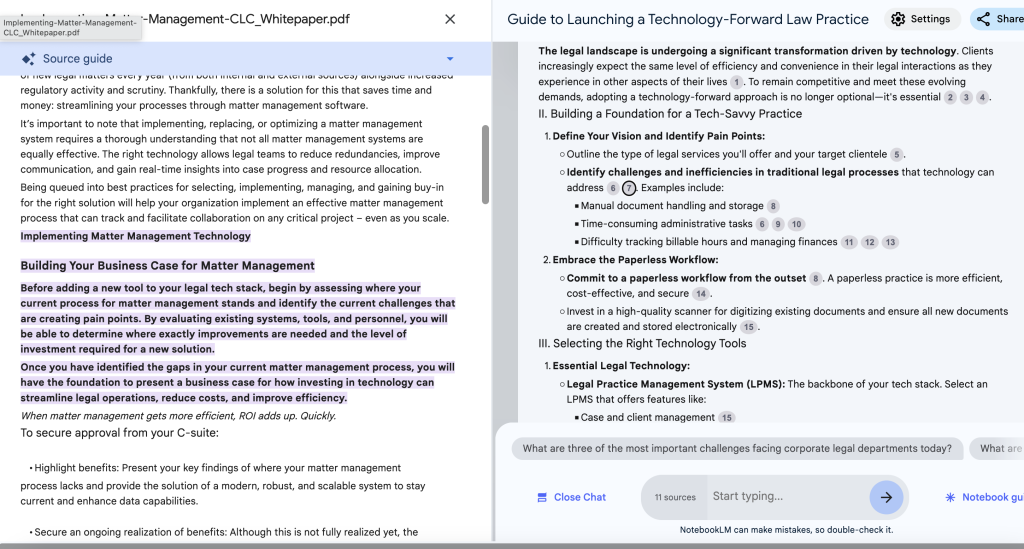
For high-level understanding and context, NotebookLM functions as an agile knowledge aide. Its browser and desktop integration makes it even more versatile, allowing seamless research directly from your preferred work environment. But remember, it won’t draft an entire legal brief or provide exhaustive case analysis. It’s best used as a companion for initial research inquiries, sparking ideas, or summarizing complex documents.
And as I opened up with, this is just one of many use cases for NotebookLM. I actually used Perplexity, the product I reviewed 2 weeks ago, to research other uses cases. My ask was: “What are some good use cases for NotebookLM?” The results came back with options from personal A.I. coach to podcast content generator. And speaking of podcasts, you may have notice in the “Notebook Guide” screenshot above that there is an “Audio Overview” button. This is such a cool feature. NotebookAI will generate a conversational summary with A.I. generated “hosts” who will give you a summary of the content you used in a podcast style format. It’s perfect for those of us who best take in our information in an aural format.
Pricing & Plans
NotebookLM is currently free under Google Labs (read: experimental). Expect a subscription model when it matures, likely in line with other Google Workspace enterprise tools. For now, take advantage of the open beta and test whether it fits your law practice (or your life). Keep in mind the eventual pricing could be competitive with other tools. I have also been coached by a few other peer A.I. enthusiast that ChatGPT and Claude can perform the same function. While true, you will have to do more prompting on your own, or have to upgrade to a paid account with either other platform to get similar results.
What Makes It A.I. Enabled?
NotebookLM utilizes Google’s GeminiPro LLM (a direct competitor to Claude and ChatGPT) to power its natural language processing capabilities. This enables the tool to understand the context and nuances of the uploaded documents and linked sources, ensuring accurate interpretation and relevant responses. As with any LLM based product, particularly one that provides summaries and insights, there is a risk of hallucinations, but it is more limited since the universe of materials searched is more limited. However, thanks to the A.I. generated intelligent citations, it’s easy to click to and reference the original content as a safeguard.
Security & Privacy
For attorneys concerned about confidentiality, a word of caution is necessary. NotebookLM‘s primary goal isn’t law firm-level security. Google have a very easy to understand Privacy support article where it states the expectation of privacy yo should have. As mentioned above, a standard gmail.com e-mail account will not have the same privacy safeguard that is afforded to Google Workspace users. It’s advisable to treat the platform like a collaborative research space—excellent for initial insights, but not a repository for highly sensitive client information.
The Judgement
NotebookLM isn’t attempting to be the most exhaustive legal research platform—it’s aiming to be the most convenient and intelligent resource analysis tool. For lawyers seeking instant knowledge boosts, practice area insights, or efficient research and guidance, this tool delivers impressively. Think of NotebookLM as your AI sidekick for moments when you are overwhelmed with data and speed, context, and intelligent document synthesis are paramount. It’s handy, efficient, and surprisingly insightful. Plus, it costs, nothing to try it.
Feedback
I’ve reserved a special space each week for you to vent, supplement with relevant info, or ask questions about the product. The only way the content gets better is if you participate. I look forward to hearing from you! You can e-mail me at rc@sabersolutions.co.