If you’ve ever felt the need to clone yourself to teach an associate or paralegal your process and workflows, Scribe might just be right for you. This nifty tool takes the dread out of creating training materials, making you look like a documentation wizard without breaking a sweat by simply capturing your screen actions. (FYI, this is not Skribe, but don’t worry, that will be one of our other upcoming product reviews).
Favorite law firm use cases: Capturing your workflows for training law firm support staff and associates. Documenting S.O.P.s. Creating step by step guides for clients and/or internal stakeholders if you are in-house counsel.
Features & Functionality
You might ask why a tool that captures workflow is appropriate for an A.I. products for lawyers newsletter. My response would be that the number one complaint I get from fellow practitioners is they “don’t have time” to teach people they hire or contract with how to “do things.” Thus enters the use case for Scribe. Can you imagine the ease of just working at your computer and the clicks and screenshots being captured while you work on a process so that your new hire understands your process? You don’t have to imagine it. With Scribe you can do it.
Scribe turns the chore of documenting a process into something almost, dare I say, enjoyable. Just hit “record” on your screen, and voilà—Scribe captures every click, keystroke, and screen hop, then magically turns it into a step-by-step guide. It’s like having a personal stenographer, but for your computer. You can operate within your browser of choice, or install the desktop application for further ease of use.
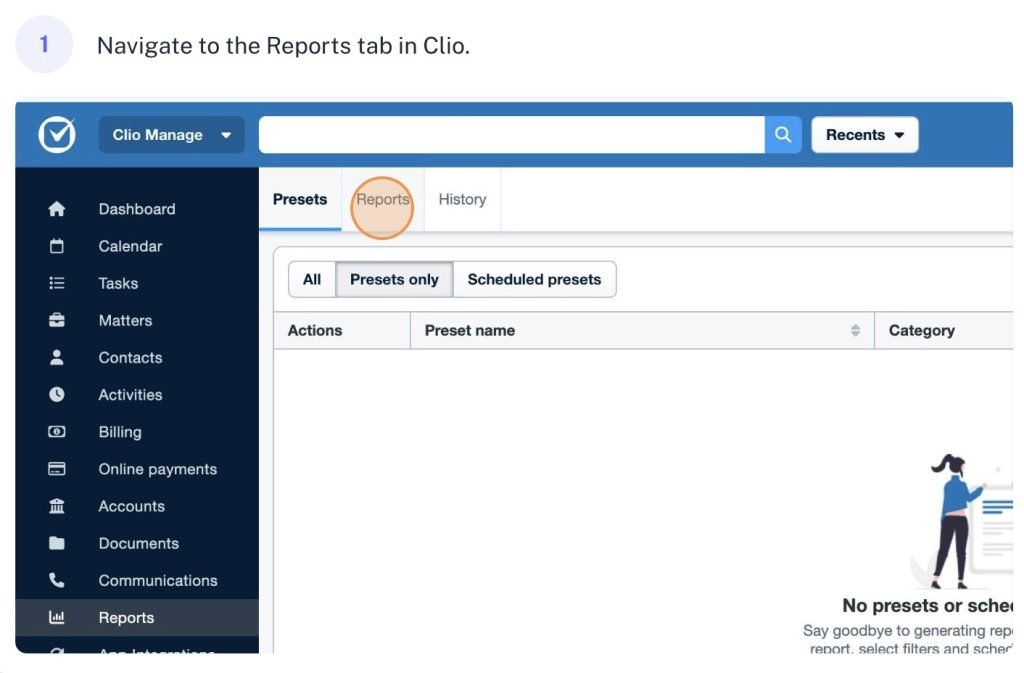
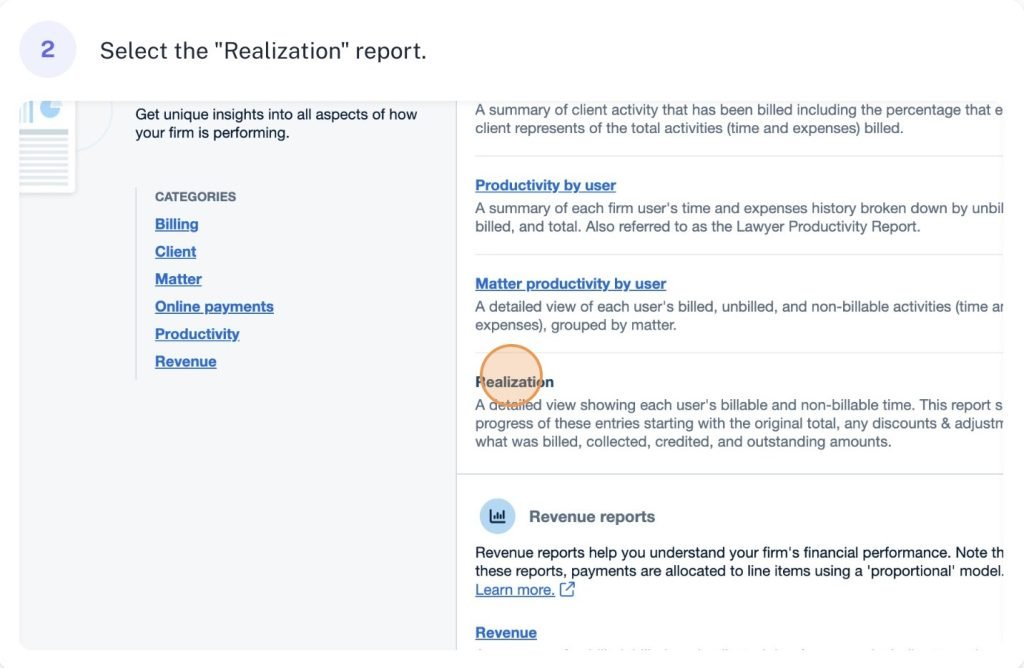
Scribe doesn’t just stop at recording your brilliance. It offers a robust set of editing tools to refine those guides. Need to rearrange steps, add a bit of commentary, or throw in a helpful hint? Easy. You can tailor the instructions until they’re as sharp as your closing arguments. Just see this workflow I captured (you will see 3 steps of a 33 steps process guide that was drafted while I worked) and the auto generated text of the steps. You can also edit the text and highlighting of clicks for more precision.


As an attorney, it so easy to get caught in day to day work and billing hours, that we don’t always have the luxury of time to teach people who can help us. That part time paralegal? That new associate? Sometimes you just want them to see what you are seeing. With Scribe, you can actually make that happen. And as you grow, Scribe can grow with you. Multiple attorneys (or support staff) can collaborate on a guide, with features like commenting and version control keeping everyone on the same page—or, should we say, the same brief. It’s perfect for ensuring that everyone in the firm is working with the latest, greatest procedures.
In short, Scribe takes the tedium out of documenting your workflow, turning it into a process that’s not just efficient, but actually kind of fun. Simply hit record while you perform a task, and Scribe captures every click, input, and screen as easy-to-follow instructions. These guides are then editable, allowing you to annotate, add tips, or remove unnecessary steps. It’s like having a tech-savvy ghostwriter who follows your every move, but without the creepy vibes.

Pricing & Plans
First, it’s easy to just try Scribe. They offer a free basic plan with limited features, perfect for small teams or solos needing to document processes occasionally. And you can just try it out. For those who need more advanced features, the Pro plan starts at $29 per user per month, offering more storage, advanced editing, and custom branding options. I started on the free plan and quickly upgraded to the $29/mo plan after testing the product.
What Makes It A.I. Enabled?
Scribe intuitively captures and converts your on-screen actions into step-by-step guides with minimal user input. This involves using AI-driven algorithms that detect, interpret, and organize your interactions—like clicks, text entries, and screen changes—into coherent instructions. The platform intelligently identifies which steps are essential and how they should be presented, saving you the time and effort of manual documentation. Scribe also features the ability to enhance and refine these guides with contextual annotations and suggestions, making the final product more accurate and tailored to your needs. This smart automation is what sets Scribe apart from traditional screen recording or documentation tools, giving it the edge of an AI-powered assistant that transforms complex tasks into simple, clear guides effortlessly.
Security & Privacy
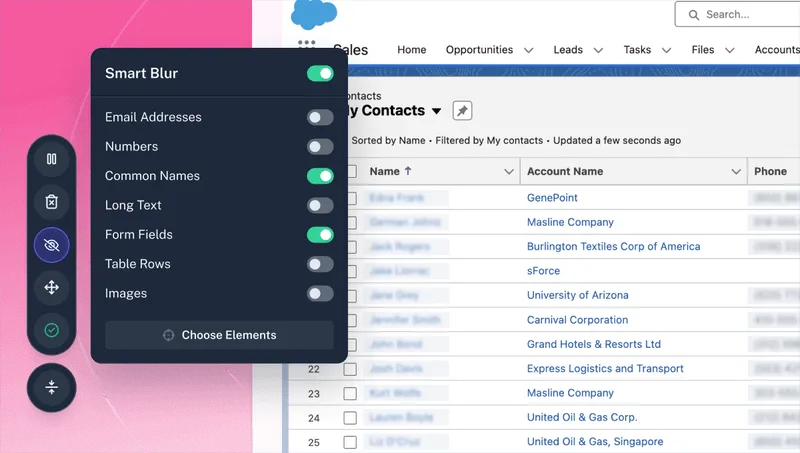
This is where it can get tricky. Depending on the process you capture, you may be capturing sensitive client information. The good news is that Scribe has a toolset including a smart blurring feature that protects sensitive information. They also claim to have robust data encryption and anonymization of data. They like to advertise to lawyers and so that generally makes me feel better about a product – when they sell to some of the pickiest customers when it comes to privacy (particularly of client information). They state that data processed through its AI is not used to train future models or shared with third parties. The data is encrypted during transmission and storage, adhering to industry-standard security protocols. This gives me the comfort I need to use the product.
The Judgement
Scribe is a must-have for any law firm looking to create or streamline internal training and documentation of processes. It’s particularly useful for onboarding new employees or standardizing procedures across teams. The tool’s AI-driven capabilities allow you to create polished, professional documentation with minimal effort, freeing up your time for more critical tasks—like billing! At least give the free option a try. You have nothing to lose.
Feedback
I’ve reserved a special space each week for you to vent, supplement with relevant info, or ask questions about the product. The only way the content gets better is if you participate. I look forward to hearing from you! You can e-mail me at rc@sabersolutions.co.