Whoever said “time is money” was clearly envisioning Vimcal in action. Dubbed “the fastest calendar in the world,” Vimcal’s promise is simple: to revolutionize your scheduling game. For professionals drowning in meetings, traditional calendar apps can feel like a slow, tedious chore. Adding events, sharing details, and sending meeting links may work fine if you have just a handful of daily appointments. But what about those days with 10 or more meetings—whether it’s with clients, colleagues, or your team? The repetitive clicks, manual link-sending, and back-and-forth can eat up your valuable time. Enter Vimcal, a game-changing AI-powered calendar (turbocharged if you use the shortcuts) that takes the hassle out of scheduling, providing the speed and simplicity you demand. Vimcal goes beyond the basics, offering features that outpace a booking tool like calendly or your standard Google/Outlook calendar. Vimcal gives you the ability to more easily and effectively communicate availability and gives you just the right amount of assistance without being overwhelming.
Favorite law firm use cases: A faster way to schedule client meetings, coordinating internal meetings, finding free time in a busy court docket calendar, potential new client consultations, lunch, and happy hours (the holy grail of calendar entries).
Features & Functionality
Vimcal is not your ordinary calendar—it’s a productivity powerhouse powered by AI and packed with features designed to simplify life for busy professionals. Available on iOS, macOS, Windows, and web platforms, it seamlessly integrates with Google and Outlook calendars, offering a cohesive scheduling experience no matter your setup.
It’s incredibly easy to set up an account, particularly if you use a Google login. No credit card is required initially, so I was able to get into the user dashboard quickly and easily. Once logged in I took a few minutes to link my calendars (I used Google enterprise, but Outlook calendars are of course supported). Then I had a view of my existing calendar entries.
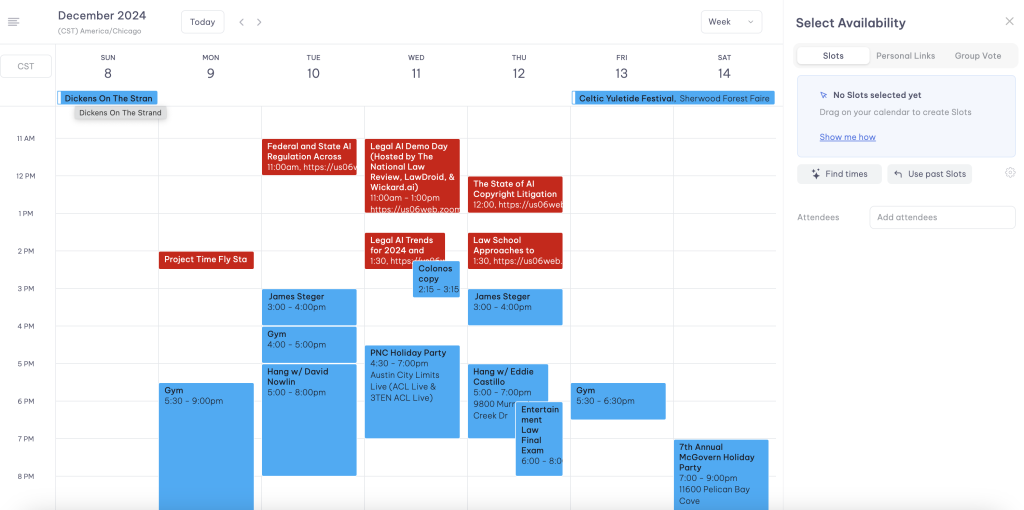
There are some great resources on YouTube that can give you a solid run-down of the all the features. I liked this one and this one for the depth they offered and they will no doubt bring up features I will skip due to time. I want to focus on what I consistently see as the pain point attorneys communicate to me: the frustration of toggling between e-mail and calendar to try and coordinate a meeting/ appointment.
Yes, there are options like calendly and tidycal (I use tidycal) that will allow you to sync with your calendars and create a customized booking link, but not everyone loves using a booking link and they don’t all sync to your own calendar. And sometimes your calendar might show you are free, but you know that you are not, or you might need to hold some time open. Vimcal gives you a view of your calendar, let’s you select open times, and auto generates a prompt that you can copy and paste into your e-mail client quickly and easily. And that is just the basic feature.
How does it work? Imagine you receive an e-mail from your client. They ask when you can talk. Go into the Vimcal dashboard and choose the “Select Availabilty” feature. Then drag your cursor across any times you see fit. It might be open times, or you might be comfortable with selecting time frames that overlap (like when you have a calendar entry for a meeting you really don’t need to be at that would normally show you as unavailable). Below, the times I selected are aqua. To the right, an e-mail is auto generated that tells the recipient your available times.
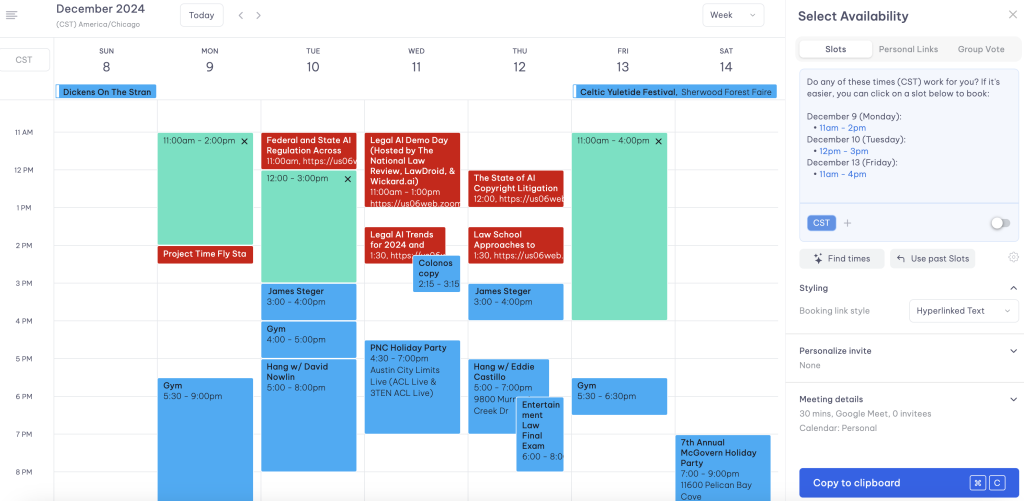
Then all you need to do is copy that content and paste it into your e-mail client. No more toggling back and forth between calendar and e-mail or looking at two different windows simultaneously. What used to be a few steps that you inherently know is a waste of time, becomes 2 quick steps.
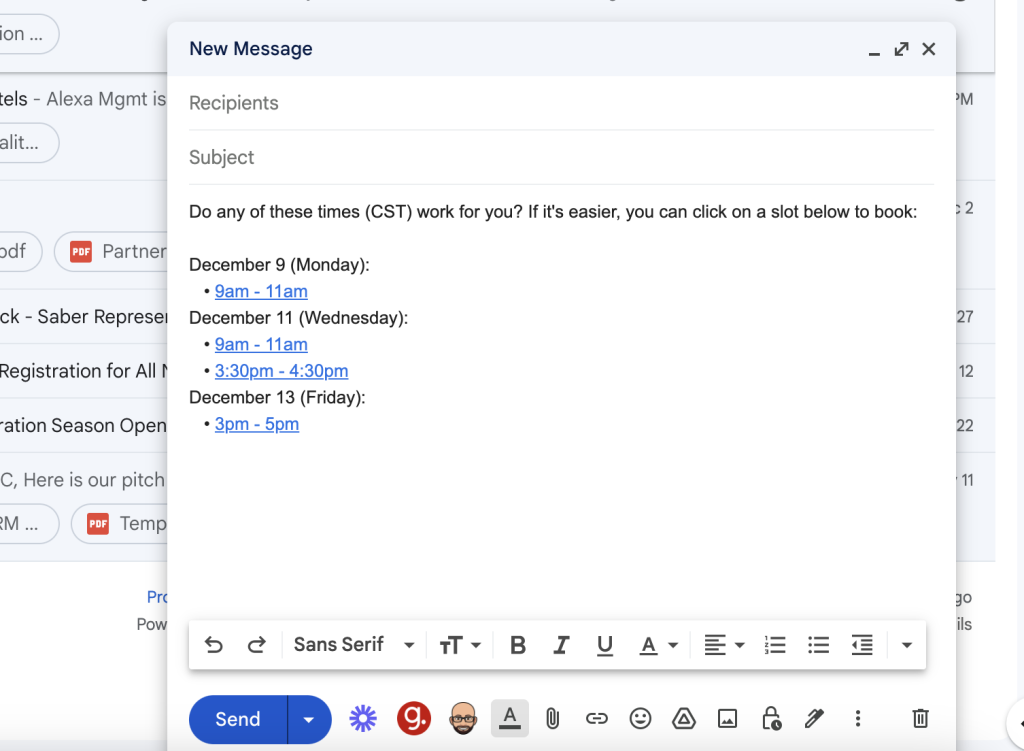
But that is just the basic Vimcal use case. One of Vimcal’s standout features is its AI-powered scheduling assistant, which takes more guesswork out of finding meeting times. With the Time Finder tool, you can ask the system to select the free times for you with easy natural language search. But what I love even more is you can upload Calendly links that others provide you that Vimcal will check against your own calendars and the AI will identify the best available time slots without tedious manual adjustments.
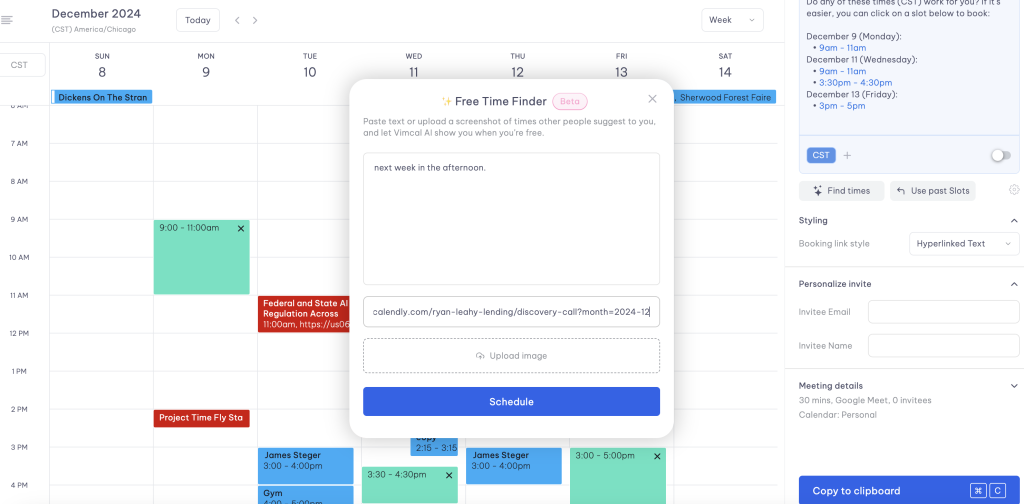
There are several other features related to selecting available time, from creating your own custom booking link to tagging meeting types. Sharing availability is equally simple with group voting tools, and customizable time slots. Need to move meetings around? The drag-and-drop interface allows you to suggest times effortlessly, while templates for recurring events streamline repetitive scheduling tasks. Other thoughtful touches include natural language processing for rapid event creation and one-click email notifications to meeting attendees.
Vimcal is also was created with the idea of using hotkey shortcuts and not being overly reliant on a mouse or scrollpad. Since lawyers frequently use shortcuts this functionality can be incredibly intuitive for practitioners who use shortcuts. Vimcal believes in the use of shortcuts as they are proven to save time and so they make the shortcut learning process very intuitive. This emphasis on keyboard shortcuts, makes managing your calendar a breeze.
Getting back to the AI, after meetings booked through Vimcal conclude, the system generates concise meeting summaries, pulling in information about attendees and companies from sources like LinkedIn and Twitter. This feature is perfect for lawyers who need quick insights before or after client calls or meetings.
Vimcal shines in its ability to handle complex scheduling needs across time zones. Its advanced time zone management makes it indispensable for connecting with far away colleagues or clients or remote work colleagues, ensuring no one misses a meeting due to time zone confusion. Additionally, Vimcal supports focused productivity with its Do Not Disturb mode, which includes a Pomodoro timer to help you stay on task during work sessions.
For a deeper dive into how these features work in action, check out this YouTube video by ToolFinder showcasing Vimcal’s capabilities. ToolFinder has a few videos about Vimcal you can view to give you a really good feel for the product. It highlights the app’s fast performance, intelligent scheduling, and ability to simplify even the most packed calendars.
Pricing & Plans
Vimcal operates on a tiered subscription model. If you only use the iOS (iphone) app the product is free. You won’t get all the functionality, but it is a good starting point. The “normal” plan is priced at $15 per user per month ($12.50/mo if you pay annually) and it unlocks advanced features like team calendar overlays, the desktop app, personal booking links and a few other perks. If you are a larger business you can work out an enterprise price (the more users, the less expensive). They also have an EA specific product that allows a savvy executive assistant who manages multiple execs (or in our case attorneys) to manage multiple peoples’ calendars. It’s offered at a steeper price (starting at $65/mo), but could be worth it depending on your admin support structure. As always, I like to plug a free trial period. I joined on their 7 day trial by clicking the “Try It Free” button and fell in love and subscribed. Give it a test drive and see how you like it.
What Makes It A.I. Enabled?
At its core, Vimcal‘s AI engine powers its time finder intelligent scheduling features, analyzing calendars to pinpoint optimal meeting times without manual intervention. This automation extends to processing Calendly links and interpreting complex scheduling constraints, offering precise time slot suggestions effortlessly. It demonstrates strong machine learning capabilities. The AI’s capabilities shine in its meeting intelligence features, automatically generating concise summaries about participants by pulling relevant professional data from platforms like LinkedIn. Natural language processing allows users to create events using conversational input, which the AI accurately interprets and schedules. Finally, Vimcal employs Chat-GPT to provide context-rich insights for upcoming meetings, enhancing preparation.
Security & Privacy
Customer confidentiality is paramount, and Vimcal rises to the occasion with end-to-end encryption for all calendar data. According to its privacy policy, user data isn’t shared with third parties or used to train AI models—good news for lawyers mindful of their ethical obligations. The platform also ensures GDPR compliance. Vimcal practices data minimization by relying on providers like Google and Microsoft as the primary sources of truth for calendar information. This means that calendar data is fetched directly from these providers and stored on the user’s device rather than on Vimcal’s servers. Once a user logs out, this data is wiped from the client device. Any minimal event metadata stored by Vimcal is strictly for identification purposes. What that means is Vimcal knows what your Outlook or Google calendar know. Thankfully the risk of disclosure of your client’s confidential data via calendar is low.
The Judgement
Vimcal isn’t just another calendar app; it’s a tool designed to streamline your workflow and reclaim precious hours in your day. For lawyers who live by the mantra “time is money,” it’s a practical, no-frills solution that delivers on speed and simplicity. Vimcal is a sleek, AI-driven tool that doesn’t just manage your calendar and more efficiently find time to meet—it transforms your calendar into a well-oiled machine for productivity. Give it a try—you may never look at your old calendar the same way again.
Feedback
I’ve reserved a special space each week for you to vent, supplement with relevant info, or ask questions about the product. The only way the content gets better is if you participate. I look forward to hearing from you! You can e-mail me at rc@sabersolutions.co.