A few months ago, while reviewing the same limitation of liability clause for the fifth time in a commercial lease agreement, I thought: “There has to be a better way to do this.” Between endless back-and-forth with the other side, tracked changes in Word, and emails with adjustments lost in different versions, I felt like I was stuck in 1998. Until I tried Gavel Exec. Let me tell you — this isn’t a tool that overpromises and underdelivers. Gavel Exec is an AI enabled treat that lives inside Microsoft Word, connects directly to your contracts, and helps you negotiate, suggest edits, mark changes, and close deals without ever leaving your file. Yes — inside Word. And no, it’s not a fancy template or glorified grammar checker. This is the AI-powered transactional practice you dreamed of.
Favorite law firm use cases: Drafting, reviewing, and automating contract creation for law firms, with a focus on transactional law matters and contract management. Popular use cases for Gavel Exec include commercial leases, real estate deals, service agreements, and —my favorite— last-minute NDAs.
Features & Functionality
When I first installed Gavel Exec, I was not sure what to expect. Install is quite easy,. Create a Gavel Exec account and download the Word add-in and you are set. A new tab then appears in your Word interface. One of the features that caught my eye was the “Playbook” tab where you can use Gavel Exec’s preexisting precedent or add in your own precedent to create your own playbooks. I selected my collection of limitation of liability, indemnity, default penalties, and force majeure clauses, and uploaded them in seconds. Here’s the first command I tested: I asked Gavel Exec to review a service agreement and flag any word, phrase, or clause that could be improved.
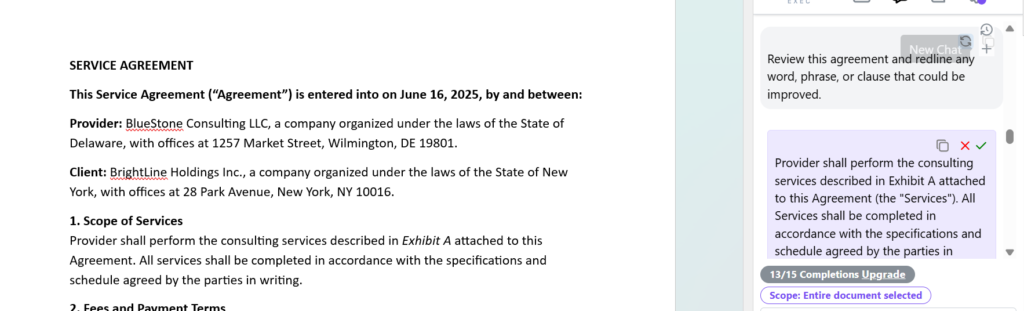
That’s where the real magic started. Imagine this — you’re reviewing a contract and you flag a clause you want to renegotiate. Instead of writing a comment or sending an email, you can select the Chat feature, provide a prompt, and Gavel Exec suggests, in real time, alternatives based on best practices, your own clause library, and industry precedents that you can define yourself. Gavel Exec has a fantastic YouTube demo that is worth the 7 minutes to watch to see the power of the product.
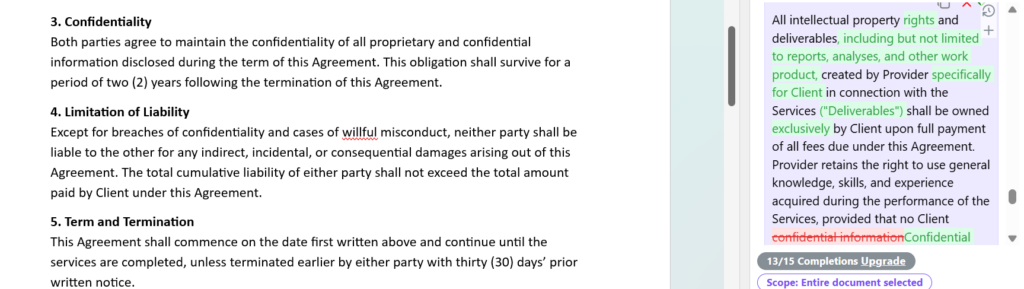
Let me show you a real example: in this contract, I flagged a section about intellectual property ownership with vague, imprecise wording. When I triggered a redline assist, Gavel Exec proposed an improved version that not only clarified the ownership of deliverables and their exclusivity for the client, but also added an explicit reference to “Deliverables” and reinforced the confidentiality section by removing weak language. The best part is it explains why it suggests each change, and you can accept, tweak, or ignore it directly in Word — no switching apps, no losing context.
It happened again in a purchase agreement: the other side proposed an absurd default penalty. I selected the clause, and Gavel Exec gave me three drafted alternatives, each with reasoning: one to reduce the penalty, another to add a gradual limitation mechanism, and a third to exclude it under certain circumstances. I chose the second, the change appeared in Word, and the AI generated an explanatory note with references to similar past agreements we’d handled.
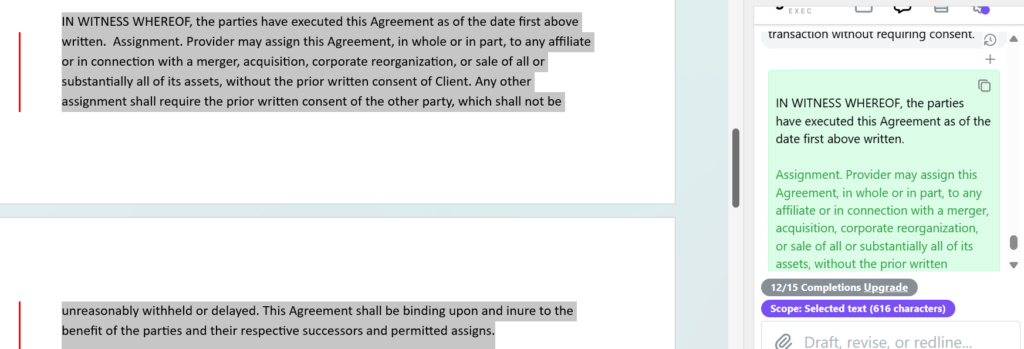
Same thing with an assignment clause, like you see in this image. I asked it to revise a signature provision to allow the consultant to assign the agreement to an affiliate or as part of a corporate transaction without needing prior consent. In seconds, Gavel Exec suggested a clear, legally sound alternative, inserted directly into the document.
Interfacing with the chat feature is powerful. Gavel Exec can scan a document and flags common risks, definition inconsistencies, or gaps in key terms. I used it on a 70-page lease agreement, and it caught three misnumbered cross-references I honestly no longer had the brain to find.
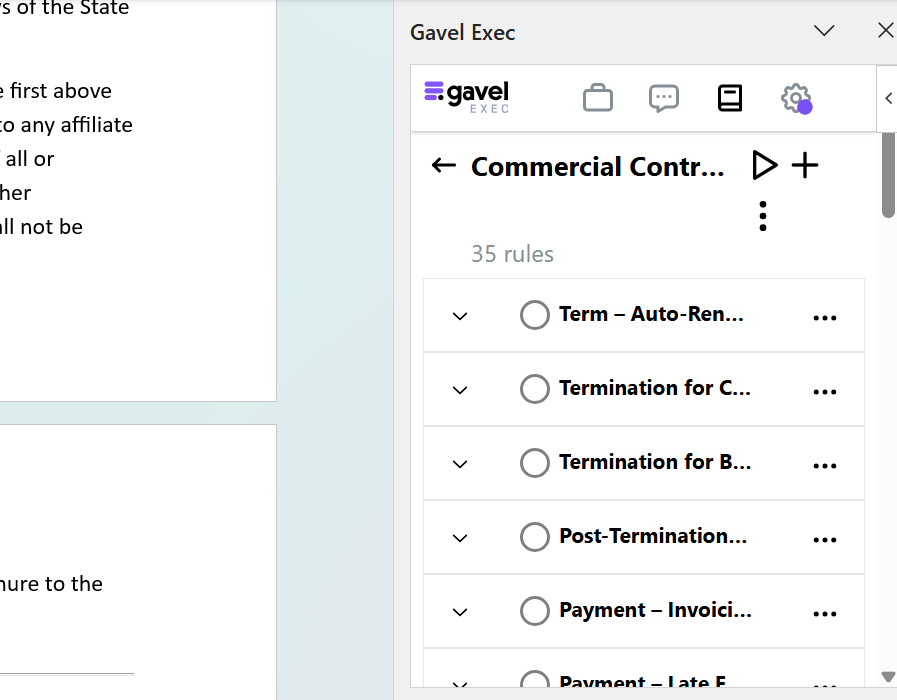
The best part: you never have to leave Word. Everything happens right where you already work and integrates smoothly into your current workflow. You decide which suggestions to accept, which to ignore, and which to adjust. Plus — as you see in this image — Gavel Exec lets you consult and customize a library of specific rules, from early termination clauses to billing policies and late payment penalties. You can even create your own rules so the AI aligns precisely with your firm’s criteria and policies. It’s like having a digital associate who never sleeps and learns from you with every contract it reviews.
Pricing & Plans
When I asked about pricing, they told me something I truly appreciated as a lawyer skeptical of new tech: you can try it for free with 15 redlines and no credit card required. After that, the monthly plan is $160 USD per user, or $1,740 USD per year. Is it worth paying that when you already have Word and a few trusty macros? Let me put it this way: if your hourly rate is $200 USD, and Gavel Exec saves you half an hour a day on redlines and negotiations, you’ll recover the full monthly investment in less than a week. And believe me — it saves a lot more than that.
What Makes It A.I. Enabled?
This isn’t a template or a fancy macro. Gavel Exec uses machine learning trained on legal language to understand the structure of the contracts you review. It learns from the clauses you accept, modify, or delete. It recognizes drafting patterns, spots inconsistencies, and predicts potential objections based on your past negotiation history. Each suggestion isn’t a blind replacement — it’s a reasoned proposal. You can see why it recommends a change, what precedents it’s based on, and adjust the tone or legal rigor of the clause based on client type or industry.
Security & Privacy
One of my main concerns when I started was newsletter ensuring confidentiality of client information. On this front, Gavel Exec is impeccable: all processing happens in encrypted environments, sensitive information isn’t used to train public models, and you can configure access levels and permissions by user and contract type. Plus, it meets international firm confidentiality and compliance standards.
The Judgement
After using Gavel Exec, the verdict is clear: it’s a valuable tool I’ve integrated into my contract drafting routine since I stopped printing contracts to mark them up by hand. It won’t replace your judgment, but it dramatically multiplies your review capacity and reduces human error in high-stakes contracts. If you work with agreements where every comma matters, if you live negotiating redlines under pressure, or if your day-to-day involves versioning the same document again and again, Gavel Exec is worth trying. After two weeks I bet you’ll want to leave it installed permanently.
Have Feedback?
I’ve reserved a special space each week for you to vent, supplement with relevant info, or ask questions about the product. The only way the content gets better is if you participate. I look forward to hearing from you! You can e-mail me here.