
If there’s a universal truth in legal practice, it’s that no one—not a single soul—enjoys timekeeping. It’s the dental floss of the legal profession: essential, unpleasant, and easy to ignore until it becomes a problem. That’s where Ajax enters with a sleek proposition: what if you never had to manually track time again, but still captured every billable minute with precision? Touting itself as a product that will help you capture 12% more billable hours (I would say that is at minimum), Ajax promises to sit silently in the background, observe your digital workday, and convert it into accurate, context-rich time entries without you lifting a finger. Ambitious? Absolutely. But as readers of the newsletter know, the A.I. use case applied to timekeeping is one of my absolute favorites and is revolutionary for the profession.
Favorite law firm use cases: Capturing billable time across your desktop environment and A.I. generated detailed, human-like time entries that sync seamlessly with billing platforms.
Features & Functionality
At its core, Ajax is an A.I.-powered timekeeping platform that observes your digital activity—email, calendar, meetings, document editing—and uses large language models to infer, generate, and draft time entries. The experience feels nearly magical. Once set up, Ajax passively tracks your professional interactions and suggests fully drafted, narrative-style time entries based on what it sees.
The A.I. isn’t just logging activity durations like a stopwatch. It’s contextual. For example, if you’re editing a contract draft in Word for 37 minutes, then hop on a Zoom with a client, then send three follow-up emails, Ajax will draft discrete, logically grouped time entries that reflect the actual work done, complete with clear descriptions. It also allows edits before pushing to your billing system, meaning the final say is still yours.
I had the pleasure of chatting with cofounder, Jack Weinberger at the ABA Tech Show in Chicago a couple of months ago where he demonstrated the product to me and gave me access to their interactive walkthrough. I’m highly impressed with the clean and sleek look and feel and how well it performs. For our review, consider yourself working within any Adobe Acrobat or Word document environment.
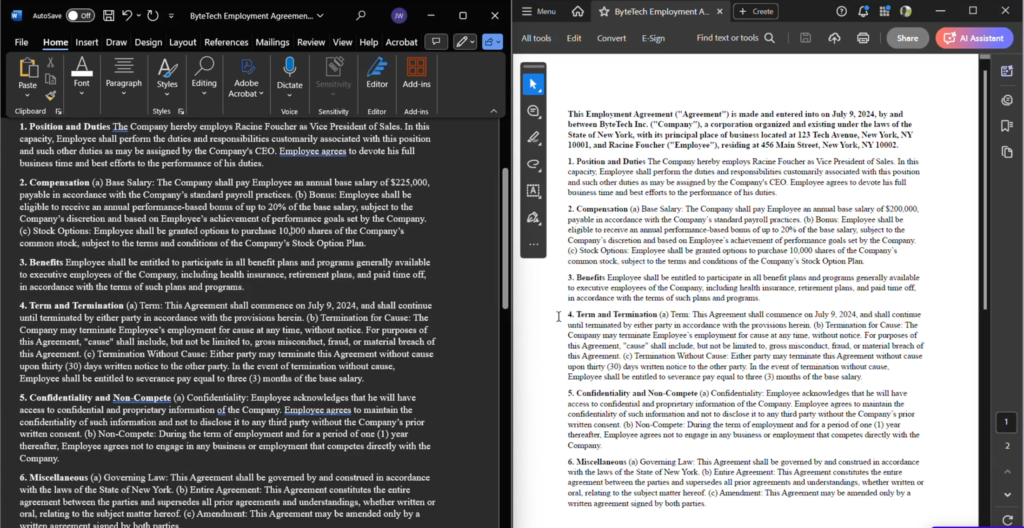
In the screenshot above you can see a review of a document in Adobe and Word side by side. What I found compelling about Ajax was how intuitively the product understood what was being worked on and could apportion time accordingly. Let’s say I’m in the two documents cutting and pasting from one to another and doing some drafting and editing. I might spend a little over a minute in the Word document and three minutes in Adobe Acrobat.
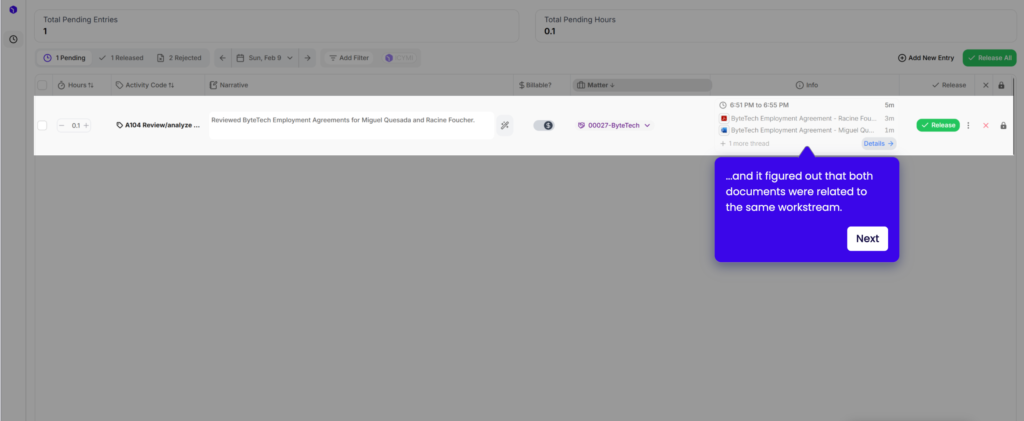
What I found pretty compelling about Ajax’s environment was its ability to smartly recognize that the 1+ minute in Word and 3+ minutes in Adobe were regarding the same matter. This is due to the tagging system that Ajax employs. If you expand on a time entry you can see the tags that the A.I. picks up helps the system to recognize how time should be apportioned.
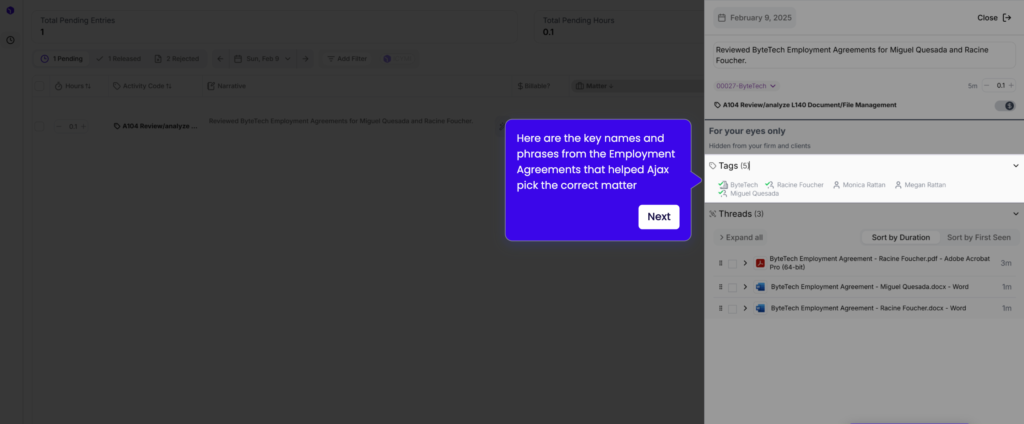
Whether you are drafting an e-mail, conducting a video conference, or working in a Word document, Ajax drafts time entires that require minimal editing effort. Once your time entries are created you can easily release them to your preferred practice management system.
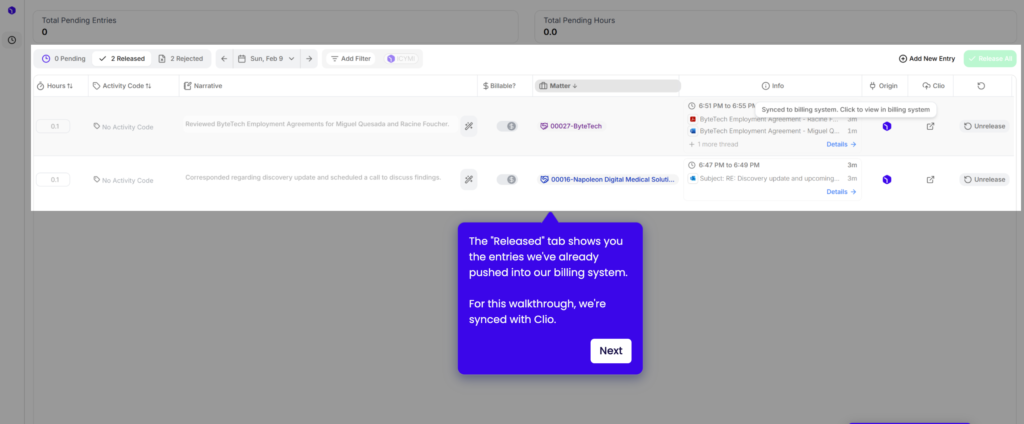
Once you have released the time entires to your system you will see them populate in you preferred platform, in this case, Clio.
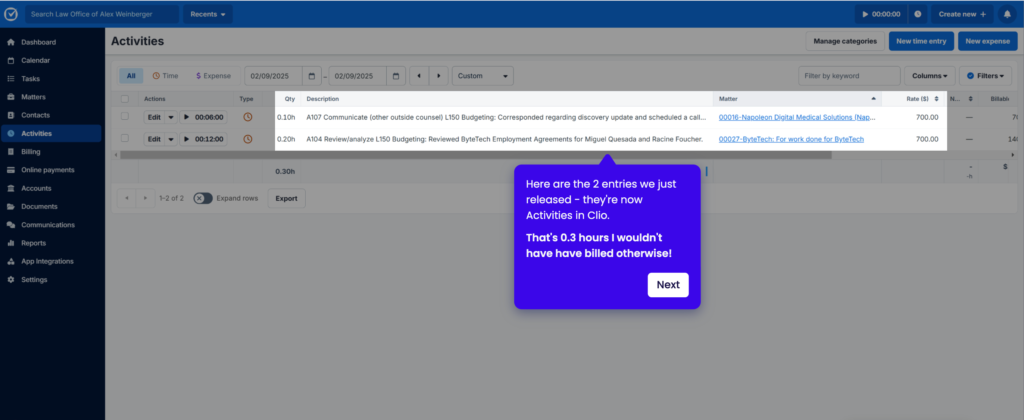
Ajax is able to accomplish all it does by a hybrid of monitoring actions in your desktop environment along with direct connections to the software platforms you most frequently use. Overall the dashboard is clean, intuitive, and—mercifully—minimalist. You can review time entries by day, approve or revise them, and send them directly into Clio, PracticePanther, Rocket Matter, or your firm’s billing system. Ajax is currently building out more integrations, but even now it supports CSV export and basic API functionality.
Pricing & Plans
Ajax offers customized pricing plans depending on your firm’s size and complexity. Pricing scales based on the number of users and activated modules. I highly recommend scheduling a demo — their team is refreshingly transparent about pricing based on your actual needs.
What Makes It A.I. Enabled?
Ajax passively captures a lawyer’s activity across their computer—monitoring screen content, emails, phone calls, chats, and calendar events—and translates these activities into time entries without requiring manual input. Ajax reads the text on the user’s screen and integrates with their programs, matching work to the appropriate client matters and activity codes in real time. It then generates polished, client-ready narratives for each entry, surfacing them to the user as they work so they can review and edit before syncing to their billing system. The platform leverages large language models (LLMs) to interpret unstructured text and adapt to each lawyer’s workflow and preferences, enabling personalized and automated timekeeping that traditional software could not achieve.
Security & Privacy
Ajax is committed to protecting the privacy and security of its users’ data. Ajax collects information necessary to provide and improve its timekeeping services, such as user account details, usage information, and data from integrated services (like calendars and email). All data handling is governed by strict privacy principles. That said, your data is automatically deleted every month. Ajax will never train on your client data, or use downstream vendors that do so. With Ajax, your data (as an individual user) is your own – not your firm’s, not your clients’. You alone choose what to release to your billing system.
The Judgement
Timekeeping is a necessary evil in the legal world—but Ajax makes it feel almost humane. For busy attorneys who can’t afford to lose hours to time entry catch-up (or worse, to unrecovered billables). It’s an intelligent, lawyer-first application of machine learning that quietly transforms a tedious chore into an effortless routine. In a world where time is your inventory, Ajax ensures none of it goes uncounted. Verdict? An indispensable tool for modern legal practice—and quite possibly the smartest administrative “hire” your firm could make this year.
Feedback
I’ve reserved a special space each week for you to vent, supplement with relevant info, or ask questions about the product. The only way the content gets better is if you participate. I look forward to hearing from you! You can e-mail me here.