Lawyers don’t write for pleasure. They write to persuade, to protect, to argue, and to communicate with precision. But achieving clarity in writing can feel like a challenge. Between long-winded sentences, technical jargon, and the constant pressure to leave no room for ambiguity can lead to confusing, or simply ineffective writing. That’s where Hemingway comes in. This isn’t just another proofreading tool; it’s an A.I.-powered assistant that helps you write the way you think—clearly, directly.
Favorite law firm use cases: Hemingway can be used as a tool for reviewing grammar
within contracts, memos, legal briefs, and client communications. It ensures your
message is understood without sacrificing accuracy—something critical in a profession
where every word matters.
Features & Functionality
Hemingway isn’t just a style checker—it’s an A.I. tool that acts like an editor sidekick. From the moment you start writing, it analyzes your text in real time, flagging unnecessarily long sentences, passive constructions, and word choices that cloud meaning. Rather than interrupting your workflow, Hemingway works with you: highlighting areas for improvement in distinct colors and allowing you to make thoughtful decisions about what to adjust and how.
What’s remarkable is that Hemingway doesn’t simplify for the sake of simplicity. It’s designed to preserve the professional tone legal professionals need, while removing the friction that gets in the way of clarity. It respects your voice—but sharpens it so your intent comes through effortlessly, whether you’re preparing a client-facing email, a contract clause, or internal notes for a colleague.
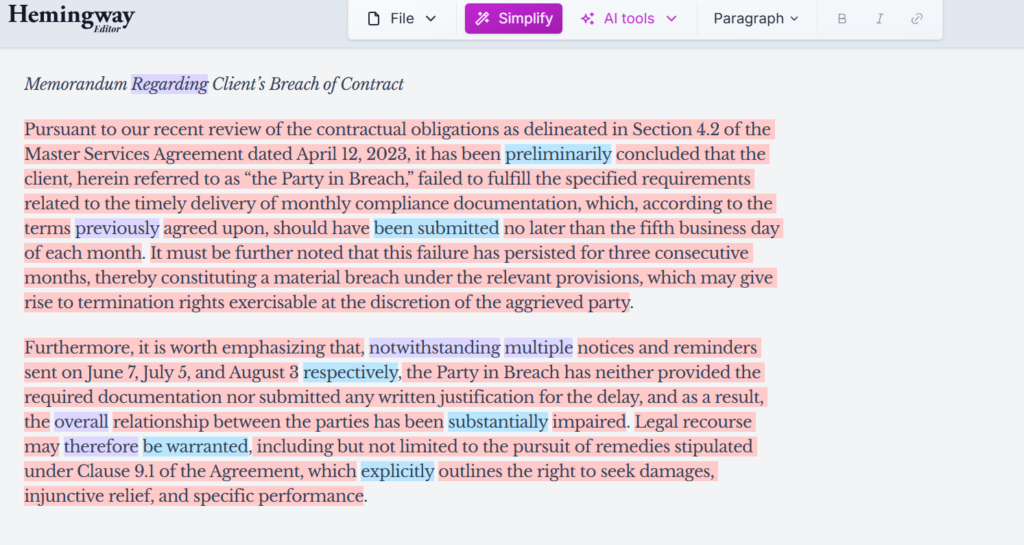
In this screenshot, you can see how Hemingway analyzes a work memo in real time, highlighting different areas that need revision using various colors. Sentences that are too long or hard to read appear in red, passive constructions or vague word choices show up in blue, and unnecessarily complex terms are marked in purple. Rather than stripping away your tone, Hemingway helps refine dense constructions that may be slowing your reader down. That makes your message clearer and easier to follow, especially when sharing with clients, colleagues, or decision-makers.
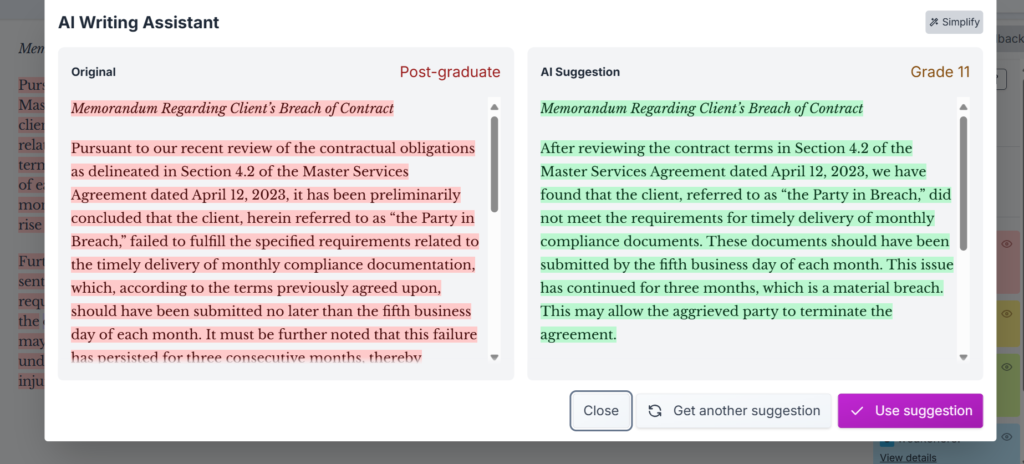
One of the most useful features for attorneys is the AI-powered writing assistant, as shown in the image. Here, Hemingway compares the original version of a paragraph—written at a “Post-graduate” level—with a more accessible suggestion rated at a school-grade level. This functionality is especially valuable when communicating with clients or third parties who may not be familiar with technical terms. Hemingway allows you to maintain credibility and precision, while tailoring the tone to your audience.
Another of Hemingway’s strengths is its focus on linguistic economy. Unlike traditional grammar checkers, Hemingway identifies redundancy, filler phrases, or needlessly complex terms—then suggests more direct, effective alternatives. This fine-tuning leads to stronger, sharper writing, especially in practical documents like contracts, reports, and memos, where clarity can have serious consequences.
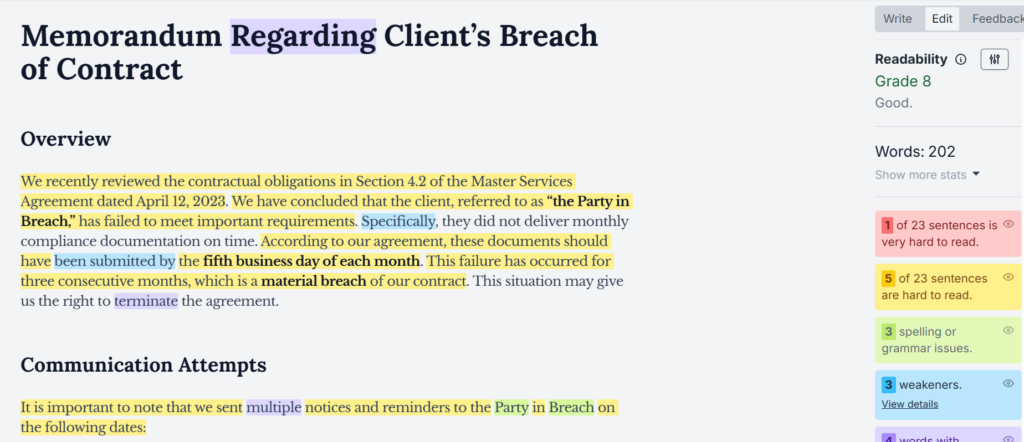
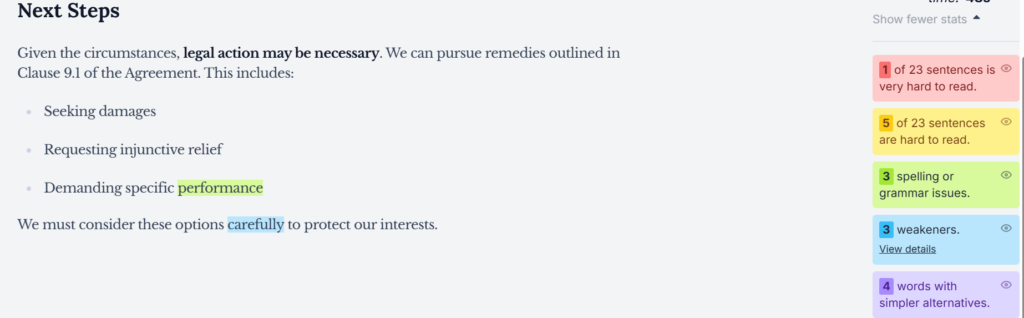
As shown in the image, Hemingway provides real-time feedback on readability, sentence complexity, and phrasing issues. Each type of issue—like hard-to-read sentences, weak constructions, or grammar mistakes—is highlighted in its own color. This makes it easy to spot problem areas, tighten language, and improve comprehension with just a few edits.
All of this takes place within a clean, distraction-free interface that lets you focus on your content—not formatting or navigation. Hemingway isn’t here to change how you write—it’s here to increase the impact of what you write. And in a world where every word counts, having a tool that sharpens your delivery without compromising substance is an edge that’s hard to ignore.
The image shows this minimalist workspace in action. On the left, a concise section outlines next steps in a client matter. On the right, Hemingway highlights phrases that can be improved for clarity—such as vague modifiers, overly complex wording, or grammar inconsistencies. The interface is clean but powerful, giving you instant feedback while keeping your focus on what matters: communicating effectively.
Pricing & Plans
Hemingway Editor offers flexible options suited for both individual lawyers and legal teams. The basic online version is completely free, allowing users to explore its core features with no commitment. For those seeking more advanced capabilities, Hemingway Editor Plus includes AI-powered suggestions to enhance clarity and precision, with plans starting at $8.33 USD per month (billed annually) and offering 5,000 AI sentence corrections. Higher-tier options are available as well, such as the 10,000-correction plan for $12.50 USD per month. A team version is also offered at the same per-user rate, allowing centralized license management for legal departments. Plus, there’s a 14-day free trial with no payment details required—perfect for determining whether Hemingway meets your firm’s needs.
What Makes It A.I. Enabled?
What sets Hemingway apart is that it goes far beyond fixing simple errors. In practice, Hemingway harnesses the capabilities of OpenAI’s GPT-3—a sophisticated large language model renowned for its deep understanding of natural language and its ability to generate contextually relevant suggestions and rewrites. The A.I. understands legal language, its complexities, and specificities. It can suggest alternatives to prevent your documents from becoming dense or difficult to understand while always maintaining the professional tone you need.
Security & Privacy
When you work with Hemingway, all your information is stored locally on your device, never sent to external servers. Hemingway states they “will never sell your data, let others use it to train an AI, or use it for advertising.” This is crucial in legal practice, where client confidentiality and data protection are priorities. Also, you don’t need to register or share personal information to use the app, giving you full control over your work product and ensuring they are always protected and under your custody.
The Judgement
Hemingway isn’t just a spellchecker; it’s an ally that transforms your legal writing into clear and precise texts. You know that every word matters in your profession, and this tool helps you keep that accuracy while making your documents easier to read. Whether you’re drafting contracts, client letters, or articles for your firm, Hemingway cuts down your editing time and ensures your message is direct and professional. If you want to optimize your writing without losing accuracy, Hemingway is the ideal solution.
Have Feedback?
I’ve reserved a special space each week for you to vent, supplement with relevant info, or ask questions about the product. The only way the content gets better is if you participate. I look forward to hearing from you! You can e-mail me here.