In the ever-demanding world of legal practice, where documents multiply and deadlines close in fast, staying on top of case updates, meeting minutes, and evolving legal memos isn’t just a challenge — it’s a constant. Notion has long been a trusted workspace for structuring information, but with the arrival of Notion AI, it steps up from useful platform to intelligent legal assistant, streamlining everything from claim drafts to case law summaries with surprising ease.
Favorite law firm use cases: Summarizing meeting notes, generating quick report drafts, rewriting policies, and organizing research findings in a collaborative, easily searchable space.
Features & Functionality
In the ever-evolving landscape of legal technology, Notion has emerged as a versatile tool that caters to the multifaceted needs of most businesses and even to legal professionals. At its core, Notion is a comprehensive productivity platform that combines note-taking, task management, database creation, and collaboration features into a single, unified workspace. Its modular design allows users to customize their workflows, making it an invaluable asset for organizing case files, tracking deadlines, and managing legal research. For those unfamiliar with Notion’s capabilities, this introductory video provides a succinct overview. Even better, there are several fantastic videos that can show lawyers how Notion can supercharge their practice.
While Notion’s foundational features have proven beneficial for legal practitioners, the integration of artificial intelligence through Notion AI has further enhanced its utility. Notion AI introduces a suite of tools designed to streamline content creation, automate routine tasks, and facilitate more efficient information processing. In this review, we will focus exclusively on the AI-enabled features of Notion AI, exploring how they can be leveraged to augment the productivity and effectiveness of legal professionals.
What stands out to me about Notion AI is its seamless integration within the workspace you’re already using. No need to switch between applications or copy-paste data. Simply open a Notion page, click the AI button, and instruct it to draft, summarize, rewrite, or generate ideas with ease. I’ve personally used Notion AI to convert meeting notes into concise summaries, draft follow-up emails, and even brainstorm names for internal projects. Its ability to assist with repetitive writing tasks and help unblock your mind to communicate effectively makes it an invaluable tool for practitioners.
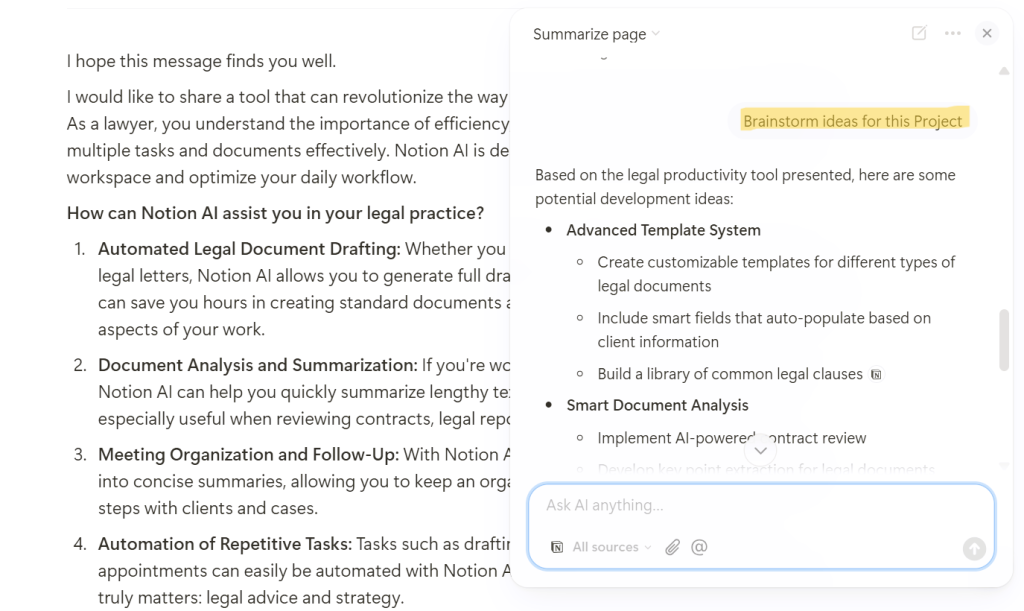
With Notion AI, you can complete tasks that once took hours in a fraction of the time. Whether it’s creating initial drafts, reports, or proposals, or summarizing lengthy documents and meeting transcripts (life of a lawyer, am I write? 😉), Notion AI provides you with a strong foundation to refine your work later. Its ability to break down dense material into digestible key points is especially useful for busy attorneys.
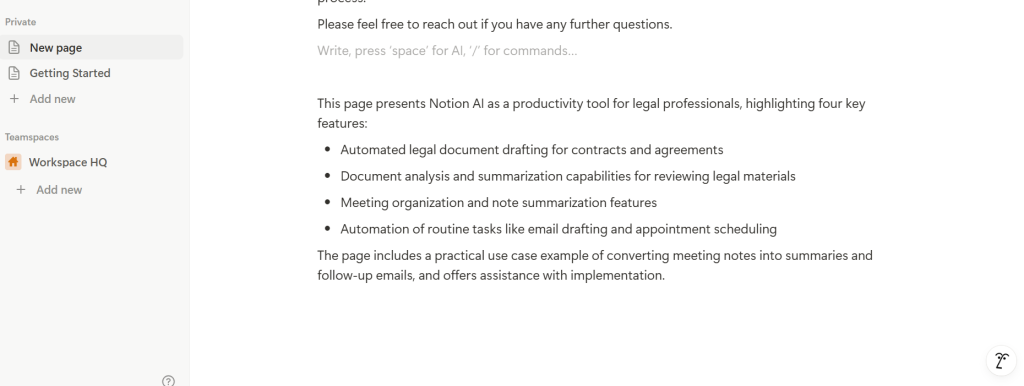
Notion AI also allows you to adjust the tone of your text according to context—whether it’s formal, casual, or persuasive. Additionally, it can automatically generate task lists, checklists, or project plans, saving you time on administrative duties. For legal professionals, this feature is a time-saver when organizing case-related tasks or drafting documents.

The interface is intuitive and operates in real-time within the Notion platform, allowing you to stay focused on your work without unnecessary distractions. What truly sets Notion AI apart is its ability to support lawyers by streamlining their workflow, allowing them to maintain focus on critical legal tasks. If you’re unsure whether it’s the right fit for your firm, I highly recommend checking out the demo video to see the AI in action and appreciate its full potential.
Pricing & Plans
Notion offers a very complete free plan for personal use, and you can add the Notion AI functionality as an additional feature for $10 USD per user per month. Considering the number of hours that can be saved on drafting legal complaints, preparing legal reports, summarizing meeting minutes, and generating ideas for legal documents, it’s an investment worth making especially for law firms and legal teams that handle a high volume of documentation and reports.
What Makes It A.I. Enabled?
Notion AI uses advanced large language models (LLMs) that generate content, summarize information, and suggest ideas directly within your workspace. For law firms, this means the ability to draft initial versions of contracts, executive summaries of claims, or meeting minutes without leaving the platform. What matters is that Notion AI understands the context of your notes, databases, and internal documents, tailoring its suggestions to your organization’s format and style. And — crucial for legal environments — Notion’s AI does not learn from your private data or your cases. The tool is trained externally and only uses your content to generate results in real time, without storing it or reusing it to train its models.
Security & Privacy
Notion implements enterprise-grade encryption and complies with international regulations such as GDPR, ensuring the protection of confidential information. According to their policy, your firm’s private documents and notes are not used to train Notion’s AI models. Plus, each user decides which content to process with AI, allowing control over what sensitive information is exposed to the assistant. This makes Notion AI a viable option for lawyers looking to optimize tasks without compromising the confidentiality of case files, legal strategies, or client information.
The Judgement
Notion AI is one of those tools you didn’t know you needed until you try it. Its ability to streamline drafting, summarize notes, and help you brainstorm ideas makes it a valuable addition for any legal or administrative team. While it doesn’t replace legal expertise or human review, it’s a reliable digital assistant that lightens your workload and helps you work smarter, faster. If your team already uses Notion, adding the AI module is an easy decision. And if you’re still unsure about these kinds of tools, this is a safe and practical way to start incorporating artificial intelligence into your workflow.
Have Feedback?
I’ve reserved a special space each week for you to vent, supplement with relevant info, or ask questions about the product. The only way the content gets better is if you participate. I look forward to hearing from you! You can e-mail me at rc@sabersolutions.co.